Google Plus-How to import your Facebook Contacts

by Sujith on 07/01/2011

The whole blogosphere flooded with the news and articles about Google’s brand new Social Network – Google Plus. Invitation offers, invitation requests, reviews etc. Now Google Plus is in Alpha phase and the access is through invitation only.

In Google Plus, Gmail contacts are linked by default and you can import the contacts from other email services also. However there is no direct option to import your Facebook contacts to Google or Google Plus. Don’t worry here the solution.

Facebook and Google have ended mutual cooperation months back  and one will not be able to import the Facebook Contacts directly to Google Plus, but you can indirectly do it that. Facebook can be integrated with Yahoo and Hotmail (Live). If you have a Yahoo or Hotmail id, you can very easily import your whole Facebook contacts to Google Plus. For that do the following steps (Here I am showing the import option via  Yahoomail)

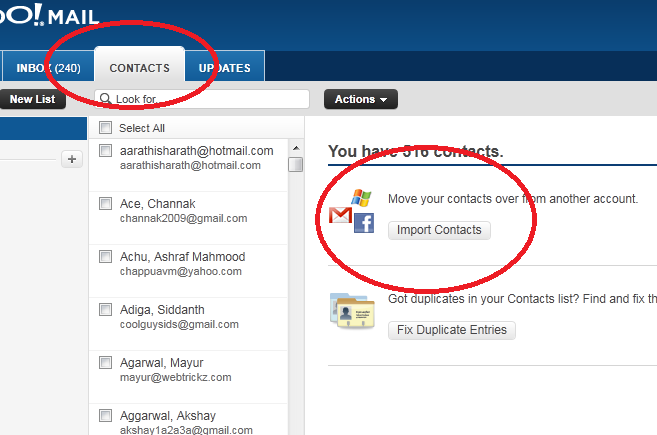
Go to the login page of Yahoomail and In the “Contact”  Tab click the “Import Contact” button
1 thumb Google Plus How to import your Facebook Contacts

Click the Facebook Button to import the Contacts from Facebook

2 thumb Google Plus How to import your Facebook Contacts

If you are not logged into Facebook, first login with your Facebook id, password and grant permission to get the contacts. You can see the progress.

3 thumb Google Plus How to import your Facebook Contacts

Your Facebook Contacts will be imported to Yahoo within few seconds. Now Leave Yahoo and come to Google Plus.

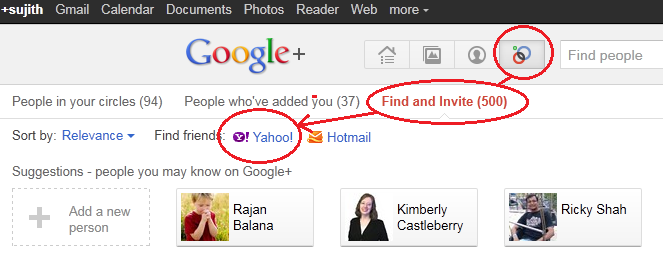
Go to the “Circles” page of your Google Plus account. In “Find and invite” tab you will be able to see the Import contacts from Yahoo, Hotmail options.
plus 1 thumb Google Plus How to import your Facebook Contacts

Select the Yahoo option and Give Permissions. Now Your Facebook Contacts are in Google Plus. Occasionally this process can throw some errors and you may not be able to import the contacts successfully. In that case go through the following additional steps.

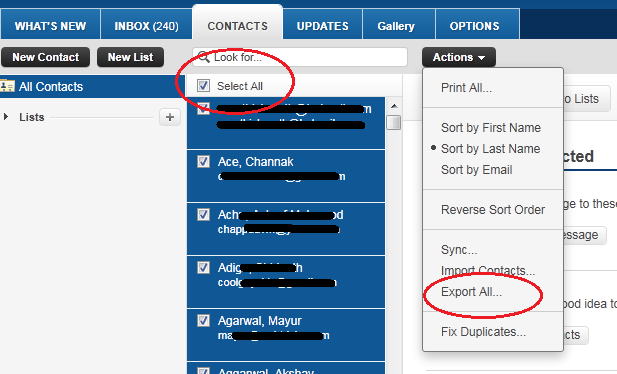
Come back to Yahoo Mail Contacts. And Select the “Export” option from the “Actions” Menu
4 thumb Google Plus How to import your Facebook Contacts

Select the Yahoo CSV Export option and Download your Contacts in CSV form.

5 thumb Google Plus How to import your Facebook Contacts

Now come to Your Gmail Account and Go to the “Contacts” Page. In the “More Actions” menu select the Import option.

import to gmail thumb Google Plus How to import your Facebook Contacts

Uploaded the Previously downloaded Yahoo CSV File.  Now your Facebook Contacts are uploaded to Gmail, and by default Gmail contacts are shared with Google Plus. Select the contacts, organize it by circling  and send invitations

Inversely you can export your Google Contacts to Facebook also. For that go through this article


{ 23 comments… read them below or add one }

Likan patra July 3, 2011 at 1:59 AM

Thanks for this trick sir,.. I have used this method to import all my contacts to google+ .. Thanks..

Reply

krishna July 3, 2011 at 5:35 PM

please send me google plus invitaiton at krishna22211@gmail.com

thanks in advance ………… please……………..please…………………..please…………………………

Reply

Shashi July 5, 2011 at 10:59 PM

Could you please send a invite to shashi.gadad@gmail.com please??
Thanks in advance,
Shashi

Reply

krishna July 3, 2011 at 3:29 PM

please send me google plus invitation krsihan22211@gmail.com

please

Reply

Sujith July 9, 2011 at 12:02 AM

Hi Krishna you r invited..

Reply

Misu Ionesco July 4, 2011 at 4:27 AM

Great find ! I haven’t got the chance to explore all this +1 frenzy, but I know I’ll have to soon.

Reply

ashwin July 4, 2011 at 11:45 AM

nice info .try cricketinash.blogspot.com. i’ve just 77 invitations. i’ve alloted 12 for my friend and wish to give away the rest. and please subscribe to my blog so that i can also gain from sending invitations!!

Reply

Arben July 5, 2011 at 12:28 PM

Can u send me the invitation for google plus on this email arben-v@live.com

Thanks…!

Reply

Sujith July 8, 2011 at 11:31 PM

Done

Reply

Techsute July 7, 2011 at 12:25 AM

But if i have indiatimes eamail id, how can i import Facebook contact in google plus, pls suggest

Reply

Bala Krishna July 7, 2011 at 9:44 PM

Please send invitation to balakr@hotmail.com

Reply

vijay July 8, 2011 at 3:15 PM

Hey Please Send me an Invite to vijaykumaarbc@gmail.com

Reply

Sujith July 8, 2011 at 11:30 PM

Invited

Reply

kannan July 9, 2011 at 8:29 AM

I am using android mobile. If I do this all my 200+ contacts will be reflected in my mobiles contact and it will be annoying and it will take another two three days to organize that itself. So is there any work around to import contact to google+ only without importing to the main google account?

Reply

nighil July 10, 2011 at 3:09 PM

pls send me a invite to nighilmohan@gmail.com

Reply

braham gairola July 16, 2011 at 10:51 AM

plzz send me invitation, i can’t wait nw…:)
plzzz….i’ll b thankful to you..:)

E-mail id: brahamgairola@gmail.com
https://www.facebook.com/brahamg

Reply

Sujith July 16, 2011 at 3:53 PM

Sent

Reply

nikhil (mumbai) July 18, 2011 at 1:38 AM

plzzzzzzzz snd me invitation …plzzzzzzzzzzzzzzzzzzzzzzzzzzzzzzzzzzzz!!!!!!!!!!!!!

Reply

nikhil (mumbai) July 18, 2011 at 1:39 AM
seomaster440 August 10, 2011 at 3:12 AM

Promoting google+ votes is becoming a very hot business. Using these types of services could have negative or positive affects on SEO.
We just have to see how google treats them. Another place to buy google plus votes is bulkones.com
Will be interesting to see how this evolves over the next few months.

Reply

Biraj Poddar September 12, 2011 at 1:31 PM

Plz send an invite 2 biraj.poddar@gmail.com

Reply

sudha October 18, 2011 at 3:26 PM

I started to work on Google Plus for the past weeks. So, I wanted to share my knowledge about Google+ in this article. I found that Google Plus did not support the feature of importing contacts from Facebook. Currently, Google Plus supports importing contacts only from Gmail, Yahoo and Hotmail accounts. I know that most of the readers want to add their Facebook contacts on Google Plus. To do this, you need to have a Yahoo ID.

Reply

Al Williams November 8, 2012 at 7:15 PM

Unfortunately this system is often revoked by Facebook’s open ID as they do not want people to export their contacts from Facebook.

Reply

Leave a Comment

*

{ 4 trackbacks }

Previous post:

Next post: