![]()
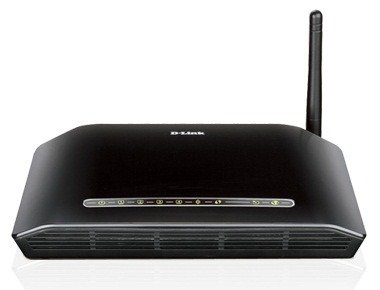
We have already published an article on the Configuration of D Link 2730 U WiFi Modem for BSNL and MTNL broadband connection. Now here the WiFi configuration and security settings of this Modem. You can very easily configure the WiFi with associated security features through the web interface. Remember – You have to configure the Modem in PPPoE Mode (Always ON mode) to get Simultaneous internet connectivity in all your PCs Laptops and other Smart phones.
Connect the Modem with the Ethernet cable to your PC/Laptop and power ON it. Open your browser and type http://192.168.1.1 . Now Enter “admin” in username and password fields to enter the Modem configuration page. In the page Click the Wireless Menu. Select Enable Wireless. In the SSID field you can type anything to identify your network- The default SSID is “DLink”. You can change it to your Name or something like that. Select your country. Then Click the Save button.
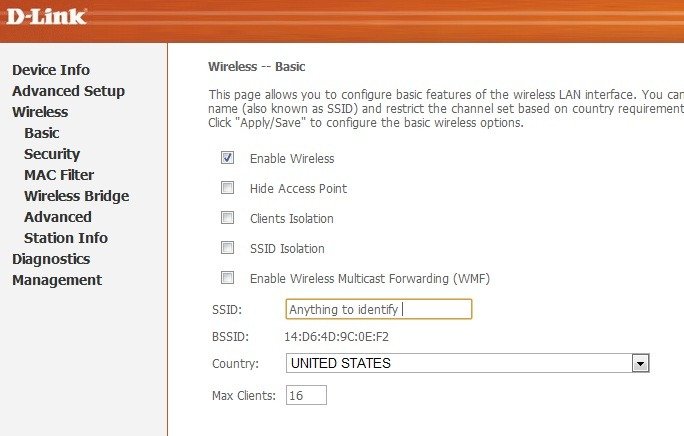
Now go to the Security Menu
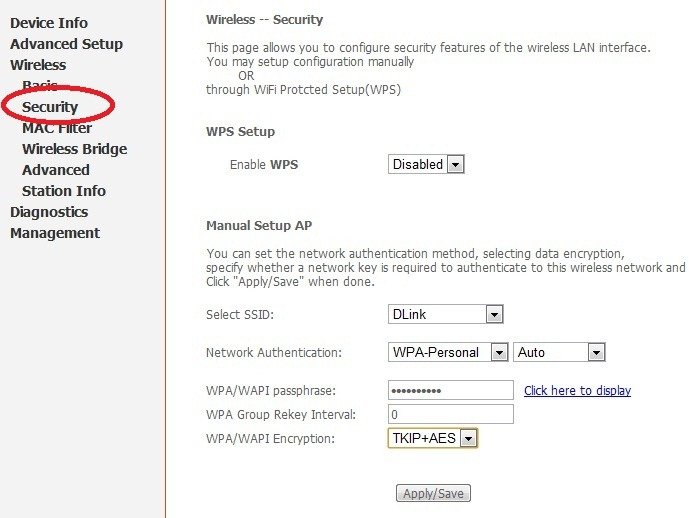
In this page you can Enable and configure the WiFi Security. Let the WPS in Disabled Mode. Select your SSID. Set the Network Authentication – WPA-Personal –Auto.
in WPA/WAPI Passphrase field enter a non guessable complex strong password- This is the password of your Wireless network. You have to enter the same in your WiFi Devices for getting connectivity. Select the WPA/WAPI Encryption TKIP+AES or AES. Apply/Save your settings.
MAC Filter (Optional for added security)
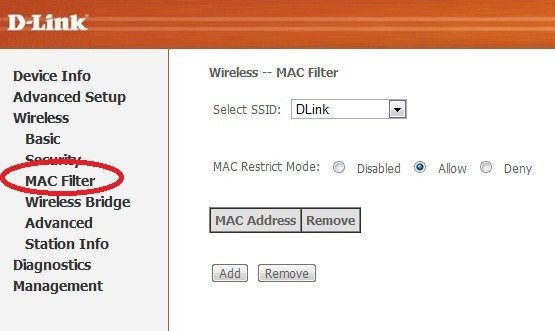
MAC filter is an added security feature to safeguard your WiFi network from unauthorized intrusion.
MAC (Media Access Control) address is a unique number of each network hardware. This is actually the id of a machine . There will not be two network cards (Any type) with a same MAC address. It is a manufacture set hard coded one.
Through the MAC filtering, you can optionally allow or deny a specific WiFi device in your network. You need to enter the MAC address of the client machines in the Modem to permit or deny a specific machine. For instance– You have four laptops in a network and you want to enable MAC filtering. For this the MAC address of each machines to be typed in in the Modem for connectivity, means you have to save the addresses of all four machines in your Modem.
How to find MAC address
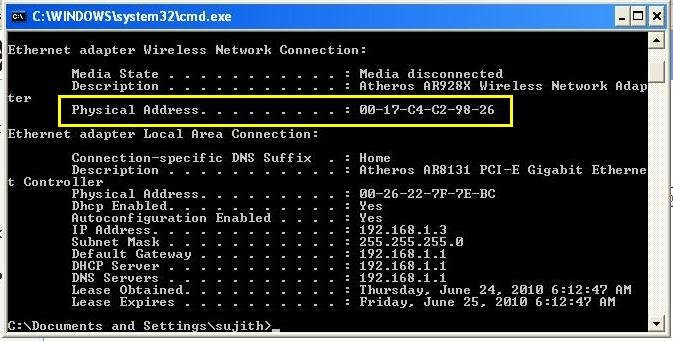
For Windows PC go to start > Run ant type cmd
Then type ipconfig/all and you will get some values as displayed.
Note down the physical address of WiFi adaptor – This is your MAC address.
Save your Settings and Reboot The Modem.
Now You can connect the Modem through the WiFi adaptors of your Laptop, PC or Smart Phones. While connecting it will ask the password which you have entered in the Modem.
{ 65 comments… read them below or add one }
This may sound off topic, but as a computer technician I have seen six dead modem/routers this year and all of them were from D-Link.
hello,i have purchased Dlink DSL-2730U modem…I am a broadband user from BSNL..the problem is that when I tried to use my Nokia X5-01 phone by connecting wi-fi I got a very slow internet connection..and even in phone’s connection manager,it shows ‘Inactive’ from time to time…My broadband plan is of 512kbps/sec..and I got good internet speed using it on Desktop by wired connection and even laptops worked @ fine speed with Wi-fi from same modem…it just cell phone that got problems…Please Help…!!!
i am also facing the same problem too, cell phone the internet is slow, but its fine on laptop, anyone has some solution?? Sujit sir, please help.
Vishal and Saurabh : Even I’m facing the same problem,works very fine with Desktop and Laptops but very slow with mobiles…If u find a solution please mail me to boyapally.rakesh@gmail.com….thank you
Edit your connection Change the MTU settings to a lower value. Enable manual MTU set( http://192.168.1.1/wancfg.cmd ) ie 1452 and try. After saving, reboot the modem. If your problem is solved please let me know
Sujith please answer me
Iam do same u say change “mut”and valu to 1452
But no thing same problem
Pleas give solve my dilnk so slow in mobile but in laptob speed
Pleas im waiting for your helping
Hi, Many other users are also complaining about the speed problem with this Modem in Nokia mobiles. I didn’t experiance any problems with other models. Trying to figure out the problem.
plz resolve this problem asap…its really annoying .
I have a Like problem but at opposite my mobile is at very good connection state so is my desktop but my laptop doesn`t connect due to the missing of the wpa any one knows it pleease help meee
I have the same modem . My laptop(lenovoB460) has windows7 professional 32 bit edition.
Initially i was not able to get connection to wifi router-modem, but now somehow by disabling IPV6 i am able to get wi-fi connectivity on my laptop( Laptop is getting the IP adress due to DHCP,and i am able to ping to that address) and once i could brows for three to four screen in google query,, after that though my laptop gets connected to wi-fi, i am unable to brows.( I tried tracert to google.com , it reaches there but with may ‘*’ marks instead of time value, also when i ping the google IP ,i get the reply back from google server but periodically it gives ‘request time out’), kindly let mw know if any setting problem. You may pl. note that I have disabled the firewall on my laptop.
Nilesh
to nilesh pleas how to do pleas tell us how to u turn of wifi please tell us step by step am waiting
Hi,
Nice article and helpful. I bought a Dlink 2730U modem/router and my ISP is BSNL. Ever since I purchased this, my MS Outlook is not connecting to my office mail server, while the internet is working fine. Office mail server is Exchange server and I need to connect to that over Internet through RPC. Is there any specific setup that I need to do to make it work?
i done the same…after entering SSID also its not saving….it is telling that no ssid should not be empty 0r longer than 32 characters …
i would to configure Dlink dsl-2750U for data card (USB) like Reliance netconnect + (ZTE chipset). Please provide guide lines. Thanks in advance.
This modem works really vey fine with Laptops(wifi) and desktops(wired) but fails to work properly with mobiles.Is there any fix for it seems like every1 is facing the same problem.Hope dlink finds 1 fix for it.When contacted customer support they answered that we care only about desktops and laptops we dunnosettings about mobile !!
Hi,
I have this DLINK 2730u for about six months and over the last 4 months i find i have no internet the internet light is red and i have to turn it off and on about three times to get it to connect. Any suggestions or take it back for another one?
Thanks,
William
hai frnd’s i have a problem with my modem.so i planed to buy new modem but this D-Link modem is suitable for my Airtel BroadBand…. pls say me i need to but it
Hi,
We have the D-Link DSL 2730U Modem with BSNL Connection. The Modem is working fine with the Wired Connections, but for the wireless connection (Laptops & Mobiles) it was not working fine. The signal Strength also very weak (Max 5-6 mtrs). So, Please suggest me how to increase the signal strength.
Thanks,
Murali
Hi Murali,
This model ( 2730u) is a new 1 into the market.People are facing problem with Mobile Phones.It works fine with Desktops ( wired),laptops and ipads(wireless),but not at all fine with mobile phones.Dint test it with Android tab.I’ve taken it to RMA centre Sec’bad but of no use coz i could not prove that problem was with the fone coz he tested with 2750 model also.If i had another mobile with me I could prove the modems arent working for mobile devices.They were not even able to understand what the problem was,such a dumb ppl.The only way is to contact higher official which is not being possible.I tried out many ways.If u find any way please mail me at boyapally.rakesh@gmail.com …. 1 more thing after testing and if u r lucky enough to make laptop work dont forget to try any mobile coz u would fail to connect that and even if connected speed is very very slow
Thanks and Regards,
Rakesh
boyapally.rakesh@gmail.com
I talked to DLINK Singapore. The phone system DLINK has in Asia sucks. They can’t speak English and no business skills. The guy that called me back in Singapore did a good job. So I was misinformed from the sales person not to turn off the router. As in the past I have never turned them off. He instructed me not to. Works fine. DLINK also told me to update the firmware which had one update available. Only thing that sucked that he did not tell was that when you update the firmware you cannot load your saved settings file. So I had to setup all the info again. Bummer.
By the way Rakesh there is no problem connecting to mobile phones with this router. I have two iphone 4′s that connect daily with no problem. Also a blackberry.
Hi William,
I’ve tried using ipad it works fine but dint try with iphone and blackberry.I’ve tried using with nokia and samsung infuse (android) where it works very slow.Please try out with nokia and android and update me.By the way can u guide me in updating firmware.
From which place are you from ?? I’m using BSNL broadband !!
Awaiting your reply ..
Hi William,
I’ve tried using ipad it works fine but dint try with iphone and blackberry.I’ve tried using with nokia and samsung infuse (android) where it works very slow.Please try out with nokia and android and update me.By the way can u guide me in updating firmware.
From which place are you from ?? I’m using BSNL broadband !!
Awaiting your reply ..
I want to ask a question can we connect two adsl routers wirelessly.. if yes how…
I have purchased a new macbook…..facing some issues while configuring my dlink dsl 2730u router…can someone let me know hoe to do it through macbook pro ?
the ping that am getting on my nokia 5800 is 159ms and sometimes around 3000+ms but on my laptop its 42ms.
i had set the MTU to 1400.
hi rishabh,
If u have set MTU to 1400 is it working fine… i mean are u getting the same speed as that of laptop and desktops ??
the speed is somewhat ohk but the ping is a problem i suppose. when i try to start a download….it never starts so how can i judge the download speed. i am only able to do browsing .even those pages sometime doesnt give any response . some apps like fring is only working only after 1400 mtu. and i was using ad hoc before, and it was working awesome but now i dont know what is the problem
Hello
I wonder if you can assist me. I have a DSL2750U router and had it set up so that my blackberry curve 8520 could connect wirelessly to the net. I do have full subscription data packages etc. Now that i have moved house i found that the blackberry connects to the DSL router but nothing happens when i use the hotspot browser. I see on the Blackberry that the wifi picture is lighter than usual and in the connections menu there is only a – sign where there should only be a correct green mark. My wifes blackberry curve is doing exactly the same. Now i surfed the net for answers and the only answer the people can give me is that you must get a new router to solve this problem. Why is that. My router is barely 5 months old. I rebooted, changed settings, mac addresses etc. and still get the same problem. I mean what has changed from my old house to the new house.?
Thanks
Hii Rishavh
I have purchased Dsl 2750U & trying to use with nokia 5800 with 512 kbps connection. When ever i open youtube of any other heavy page so it’s stop working. Every time i need to reboot the router to reconnect my mobile to woreless connection. If you have any idea about this problem…..please help me out. my E-Mail address is bigj3.v@gmail.com.
FOR ALL YOU GUYS OUT THERE WHO USE NOKIA WLAN PHONES WITH THIS MODEM,(DLINK 2730 U)
HERE’S THE SOLUTION…..
JUST GO TO MODEM CONFIGURATION PAGE (192.168.1.1)
GO TO WIRELESS..
GO TO ADVANCED..
SCROLL BELOW
AND YOU SHOULD FIND
WMM NO ACKNOWLEDGEMENT DISABLED..
MAKE IT ENABLED..
AND
ALSO BELOW
YOU WILL FIND WMM APSD ENABLED..
MAKE IT DISABLED..
CLICK APPLY/SAVE..
THEN YOUR WIRELESS CONNECTION WILL GO UNSECURED ..BUT DONT PANIC..
CONNECT IT AGAIN,,
AND GO TO 192.168.1.1 AGAIN..
GO TO WIRELESS>SECURITY
THEN SECURE IT AGAIN..(WITH WPA/WEP WHATEVER YOU LIKE)
YOUR PREVIOUS KEY WAS SAVED…NOT NEED TO CHANGE IF U LIKE..
THEN YOU ARE DONE..
CONNECT YOUR NOKIA..
YOU SHOULD GET GOOD SPEED..
Thanks Debmalya Paul.. Good job.
u r most welcome and my pleasure…sir!
Awesome Paul , Was eagerly waiting for a fix and thank you for posting it !!
i have a nokia 5800. Even after appying this fix. Am getting max 30kbps dnld transfer rate, whereas i should get 60kbps.
And connection still drops many a times
Me too facing the same problem.
still getting only 10-15kbps. my wifi is of no use on my cell. i am unable to return back MTNL’s modem untill i get this fixed.
@RISHAB–MAY BE YOUR BROADBAND SPEED WAS DOWN THAT PARTICULAR TIME,,,YOU ARE COMPLAINING ABOUT ONLY 30 KBPS,,THAT S NOT MUCH.AND BSNL/MTNL DNS SERVERS ALSO BE VERY BUSY AT PEAK HOURS…
WELL RISHABH WITH ADDITION TO MY PREVIOUS POST OF CONFIGURING THE WMM APSD OF DLINK DSL 2730 U MODEM,,THERE IS ANOTHER TRICK YOU CAN TRY(REMEMBER WMM APSD MUST BE DISABLED)…I M NOT SURE ABOUT IT..BUT U MAY TRY..ITS ON YOUR PHONE..
JUST TAKE YOUR NOKIA 5800
MENU>SETTINGS>CONNECTIVITY> WLAN WIZARD>CLICK OPTIONS>SETTINGS>CLICK OPTIONS>ADVANCED SETTINGS>
THEN YOU WILL RECEIVE A MSG “CHANGING ADVANCED SETTINGS IS NOT RECOMMENDED,CONTINUE ANYWAY?”..>PRESS YES..
YOU SHOULD FIND THEN “AUTOMETIC CONFIGURATION ENABLED”..
MAKE IT DISABLED…
THEN U SHOULD SEE
MORE OPTIONS POPPED UP JUST BELOW..
AT THE BOTTOM YOU SHOULD FIND “POWER SAVING ENABLED”
MAKE IT DISABLED…
AND LEAVE IT LIKE THAT..
SEE BACK AND EXIT..CONNECT THE WLAN AGAIN SEE WHAT HAPPENS..
IF YOU STILL GET SLOW SPEEDS
@rakesh-thanx..bro..
AND ANOTHER THING I GUESSED ABOUT THIS MODEM THAT ITS FIRMWARE IS NOT THAT MUCH SMART HANDLING DYNAMIC DNS ADDRESSES,SO CONNECTION DROPS SOMETIMES IF DNS CHANGES.AND THE WIRELESS ALSO RESTARTS….SO TRY TO USE ANY STATIC DNS ADDRESSES IN WAN CONFIGURATION.
WaRninG::…….(IT HAPPENED IN MY CASE NOT NECESSARY IT WILL BE TRUE FOR ALL ,,AND I ALSO LOWERED THE MTU VALUE TO 1200 WHEREAS I HAVE A 2MBPS DOWNSTREAM AS I FOUND THE WIRELESS DROPPED FREQUENTLY AT HIGHER MTU S..BUT NOW I M GOING JUST FINE..!!)..
ok thanks for the reply Debmalya. I tried your trick and it did worked like a charm. This is the first time after buying this modem i got to se the actual speed as my bandwidth. There is still a ‘but’ and a doubt.
My mtu is set to 1492 and am using static dns. My connection droped twice during a 4mb download.
And the doubt is that before i have this modem i use to use ad-hoc from the laptop and it use to work fine.no drops and max speed. Then why do i need to disable power saver for this modem. In 5min my phone got hot and my battery is also 3yr old. I dont think i wil be able to surf like this for long.
By the way thankx again
@rishabh – i think its only because of the combination of d-link and Nokia…bcoz dlink adsl +2 modem s are equiped with very complex techlogies like wmm APSD technology(((but unfortunately in India,middle east,thailand,indonesia to keep the price cheap they dont provide that good hardware to match it–u can search the original dlink dsl 2730 u looks a bit different which was launched in usa,europe,australia a long time ago,,but now discontinued there it looked like this.. http://www.youtube.com/watch?v=Q69BTayAlKI ))))..APSD stands for automatic power save delivery..
However whenever it(the modem) detects a device with power saving capabilities or modes (like nokia) it automatically throws data to the device with less packets per unit time.. thats the problem..the comb. of nokia and dlink and cheap low quality hardware with high profile software interface of dlink….no problem with nokia itself..
trust me,,i have the same modem and nokia c6-01..i had a lot of problems too…
and this modem’s wifi connection is not reliable at all(to me atleast)…i had a lot of problems with the modem,..like the wifi sometimes hangs..autometically restarts,,
i can see the wifi led solid..but u cant find any wlans..sometimes when i start the modem the wifi light doesnt go green at all…after several restarts,,u may turn it on…like that…this modem has just took my sleep away…
i hope newer Nokia phones will work normally. planning to buy one.
I have a similar problem as William had,the router work fine,but after I switch it off and then start it a red light appears on the globe icon,I have to then do all the settings over and over 3-4 times before the red light turns green.I tried calling DLINK India they said it must be a hardware issue,I searched for a firmware update but none was available,I tried the firmware update on the dlink Singapore site but my router would not let me update to that firmware..any solutions would be appriciated
hi,
i’m hemdeep
thank you very very much. it is oooooooosome man. than’s again……..
Please help me using usb on android
hi sridhar,
actually i don’t understand you problem. please describe for help related android.mail me at hmdeep18@gmail.com.
Hello
Well i also bought the Wi-fi Router that works fine with my PC but not on my Galaxy Phone……It will connect with password and even get the IP address but cannot surf the website….plzzzzzz help me out….
hey..i think the solution is in Advanced Wireless settings…I enabled Xpress Technology there…nd kept WMM as ‘auto’ and now it works very good for my cell phone also..!!
The signal for the LAN and Status blinks continually and the signal for the internet is red may I know what does this mean??? I am using a broadband connection with a D-Link modem
i recently bought asus RTN10E it has all ports as rj45 can i connect to broadband using this router
sujith,
i tried to cnfigure wifi on my laptop(xp sp3) with dlin dsl2730 u modem. it showed the error code 871122 to check in microsft.com. could you please help me
Go through this link http://support.microsoft.com/kb/871122
Hi, am using d-link Wifi 2750u that it is with modem… but the prblm is am having Wifi Hot Spot Internet connection on 1 mbps.. the connection directly comes with Hot Spot without modem.. so now i hav the device with modem dat needs to connect.. so plz help me to connect without using modem i want to connect Dlink 2750U wifi…
Thanks in Advance…
I had contacted the customer service of D link through live chat the executives of d link is not only idiots but dump fellows too.
I am having an Ethernet connection via cable.I want to configure DSL 2750U adsl2+ to be used only as a wireless router for my laptop and mobile.anyone having knowledge,please help me to set it up.
Hi sir, I have a DLink Wireless N 150 ADSL2+Modem router. I want to know if i can limit the access to my wifi with some specified time. So that a guest user can use my wifi only for a specific time.
hi,
thank you very much sir, this article was very helpful…..
It was very useful and was quite simple steps to finish up my work !!thanks a lot
Hi,
Sir this is dinesh..i am useing D Link DSL 2730 U WiFi Modem…but i am unable to connect laptop with this wifi…when i starts wifi in my laptop its showing the wifi name..but it showing network authentication failed…i am useing windows 8 os…Thank u
hello
iam lost dsl2730u modem cd please give me link for download cd software
How to connect Dlink 2730U behind other router and use the internet connection of the earlier configured wired LAN.
I have dlink 2750u. Internet speed in my windows 7 laptop (g mode) is more than in my windows laptop (n mode).
Im using link 2750u. Internet speed through wifi in my windows 7 laptop (g mode) is better than my windows 8 laptop (n mode)
can u please tell me how to connect blackberry 8520 with this dlink 2730u
9 out of 10 times m not able to connect through wifi
I am facing a problem with my Dlink 2730U. It started when i tried to configurat it from a site by Dlink and from that time it works like 5 minutes and the internet stops and i reconfigurat it but the same thing happens over and over again.. please i need help
Thanks, many of your DIY were extremely helpful