ZTE ZXDSL 531 is a WiFi modem supplied by BSNL with their broadband connection. This guide help you to enable and configure the WiFi security settings of ZTE ZXDSL 531 Modem. With this guide, you can configure any type of WiFi modems irrespective of brand.
1 Connect your PC/laptop with the router using Ethernet cable and in your browser type http://192.168.1.1
2 A popup window will be displayed to enter user name and password – Type “admin” in both the field (Assuming that you have not changed the default password. If changed enter the same accordingly).
3. Click on the wireless menu – In Wireless you can see Basic, Security, Mac Filter, Wireless Bridge, Advanced and Station info Sub menus. Now you are in “Basic“menu. This page allows you to configure basic features of the wireless LAN interface. You can enable or disable the wireless LAN interface, hide the network from active scans, set the wireless network name (also known as SSID) and restrict the channel set based on country requirements.
Click “Enable Wireless” check box and in the SSID field enter the name of Wireless network. Select the country of operation. You can enter the number of clients can access this network simultaneously. For Eg: If you put it “2” then maximum two computers can access this network at a time. Click ” Save /Apply” to configure the basic wireless options.
Security Settings
4. Click on the Security menu -This page allows you to configure security features of the wireless LAN interface. You can set the network authentication method, selecting data encryption, specify whether a network key is required to authenticate to this wireless network and specify the encryption strength.
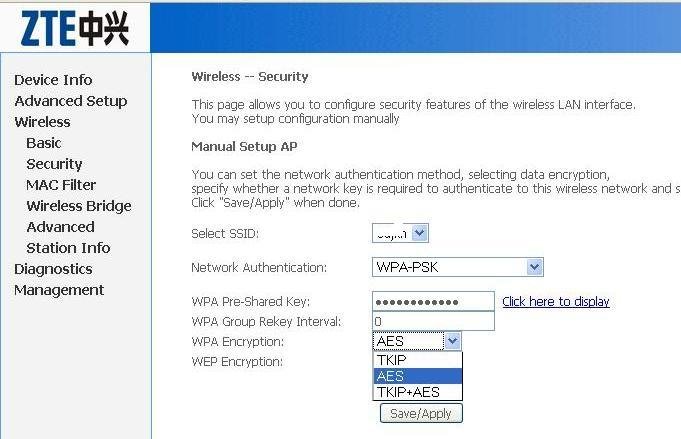
There are different WiFi security encryption standards. As per your operating system and the compatibility of WiFI adapters you can configure the settings accordingly. Details of the WiFi standards and their application will be explained in a separate post. Now we can select the most secured format.
- Select the SSID (Which has been set in the previous step)
- Select WPA2-PSK from the network Authentication drop down menu
- Enter a non guessable key (No dictionary words) mixed with figures and characters in WPA Pre Shared Key field.
- In WPA group interval field, you can enter 3600 (This is the interval between the keys are refreshed means of you set 100 your keys will be refreshed every 100 seconds)
- Set the WPA encryption to AES
- Click “Save Apply”
MAC Filtering
Mac filtering will give you additional foolproof WiFi security. MAC (Media Access Control) address is a unique number of each network hardware. This is the identity of a machine . There will not be two network cards (Any type) with a same MAC address. This is the manufacture set hard coded one.
Through the MAC filtering you can optionally allow or deny a particular WiFi device on your network. You have to enter the MAC address of the client machines in the Modem to allow or deny a particular machine. For example – You have four laptops in a network and you want to enable MAC filtering. For this the MAC address of each machines to be entered in the Modem for connectivity, means you have to save the addresses of all four machines in your Modem.
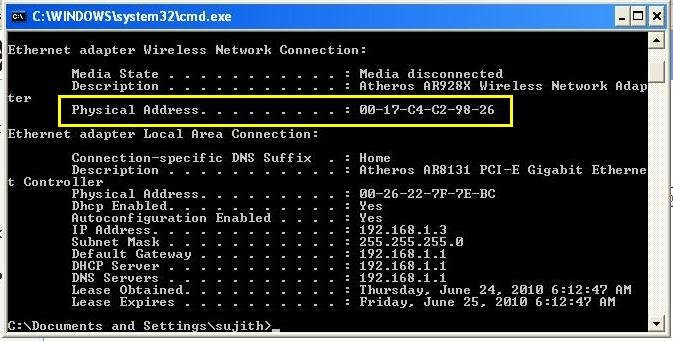
How to find MAC address
- For Windows PC go to start > Run ant type cmd
- Then type ipconfig/all and you will get some values as displayed.
- Note down the physical address of WiFi adaptor – This is your MAC address.
Click on the “MAC filter” menu of the Modem configuration page. In this page you can see MAC Restrict mode “Disabled” , “Allow” and “Deny”. The default setting is “Disabled”.
Click on the Add button below and enter the noted down MAC address .
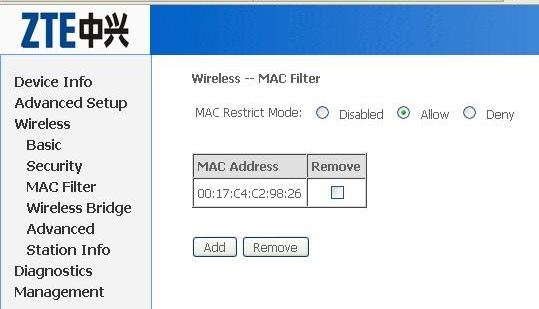
Important: You might have noted down the MAC Address like this 02-14-C4-C2-98-26 but if you enter like this Modem will display an error message “invalid MAC address”. You have to replace the “-“ with “:” means to enter the address like 02:14:C4:C2:98:26
Then click “save/apply” button. Now your MAC address has been added. Like this way enter the MAC addresses of all the machines intended to use with the WiFi network.
Now you can optionally allow or deny a particular or group of machines on your WiFi network. If you want to allow one or more machines – Set the “Allow” option and select the MAC addresses of corresponding machines to be allowed. To deny a particular machine , set the “Deny” option and select the machine to be denied.
Advanced settings
In the advanced settings menu of ZTE 531, you can configure advanced features of the wireless LAN interface. You can select a particular channel on which to operate, force the transmission rate to a particular speed, set the fragmentation threshold, set the RTS threshold, set the wake up interval for clients in power-save mode, set the beacon interval for the access point, set XPress mode and set whether short or long preambles are used.
In the standard conditions the default setting will work. You need not to configure anything.
Settings in Computer
In the Control Panel select Network connections and Right click on the Wireless Network connection. Select “View Available Wireless Networks”. A “wireless network connection” dialogue box will be opened which display the available connections within the range. Select your WiFI network and click “Connect” . Here you have to enter the same key which has been set in your Modem.


{ 54 comments… read them below or add one }
Hiiiii
My ipod touch successfully connected to network but no website is opening Please help
You need to configure your modem as always on. It means on your computer your broadband connection’ll be as ‘always on: requiring no manual connect’. After that your modem’ll on and connect to internet without manual connection making. And now you can open sites on your Touch.
Can u tell how to put the modem on always on mode?
I m unable to find the option.
Thanx in advance
Sir,
How to use teamviewer?
Thanx
Securing your wifi routers is the prime thing before starting to use it.
I have seen many people even leaving their routers open. Some of the even do not care to change their default passwords and login details.
I just prepared a list of more than 500 models of routers and their default passwords. This link is there in my name.
Thanks,
Good work Silki. Thanks
Hi,
i have this modem at home, i was trying to connect ipod touch to do facetime, but looks like some ports are blocked due to which i could not able to do facetime. Can you please tell me how to fix it?
Thanks in advance.
Hi Jitan, I have no experience with facetime. In the PPPoE mode by default the ports are blocked. You need to open the required ports same as in the case of torrents applications. Go through thsi http://foribb.blogspot.com/2010_07_01_archive.html and you will get some idea about the port forwarding. If you are facing difficulty in opening the port you are free to contact.
hi i am nafih
i can only acces internet my phone through my phone when desktop is connected. when i turn desktop off , in my phone web page wont come..
thank you so much Sujith, your help in getting my modem configured was amazing. Very nice experience. Please keep up the good work.
Thanx a ton, Sujith. This is some amazing stuff yoy have here.
Sir
..i have a desktop PC nd and this MOdem…nd i want to connect my phone to it..but i dont know what is SSID nd how hud i come to know bout it..i have no idea what it is..
SSID is for identification. You can use anything. Eg; Your name or something like that
Thank u sir,…
i succesfully connect my SAMSUNG OMNIA WINDOWS PHONE to it..my phone is showing that it is connected to ZTE succesfully but i m not able to open any site…..kindly Help..nd i am Very VEry thank full for the previous help….
In which mode you have configured the modem? Always on mode (PPPoE Mode) or Dial up mode?
….sir,
i wud like to confirm whether i have to check the botton below the MAC filtering option or do i have to leave it unchecked……i have selected ALOW button already….i have added two MAC addresses in the box ..so do i have to check them both to allow them to ccess the sites???…though they are unchecked now but my both the Windows phone and the androd phone are getting connected but not showing up the websites…….:)
nd yes i ahev configured my Modem in PPPoE mode
I configured the ZTE ZXDSL 531B router in PPOE mode, set MTU-1442, but still yahoo & hotmail not opening.Plz help
It may be due to DNS issues. Clear all browser cache , Go to start > run> cmd and type
ipconfig/flushdns
Now try again
Sir… thanks for your suggestions….. my router was not working or properly.. but now it do…thank u very much…u r d best
sir,
i conect my laptop but i can’t open my homepage plz help me
sir i configured the bsnl modem for wifi connectivity. it connects on to my phone nokia c3 but i cannot open any website. please help
i have configured my modem over pppoe mode
How to reset bsnl ZTE modem . I am also not able to connect to 192.168.1.1 . DCPH Enable is showing no . Please Help , status is showing limited connectivity
Here the Reset Button. Press it for few second with a match stick or something like that
http://dl.dropbox.com/u/26660117/zte.jpg
Thank you so much for the help . There is one more question . I want to connect my mobile phone with the modem through wifi . I am able to connect it when the connection is establish through my computer . But as soon as I disconnect the computer the wifi connection on mobile phone also goes out . Please tell me how to connect the mobile with the modem through wifi without switching on the computer . I have searched somewhere and found that might be done through enabling PPPoE always on but , I also do not know that
http://www.techlineinfo.com/configure-zte-zxdsl-531-type-2-4-lanwireless-lan-modem-for-bsnl-broadband/
Go through this post
Dear,
pl tell me i want to add my cable internet connection on zte wireless modem. cable internet connection getting dhcp mode. so how to configure and work with this modem.
This Modem is not compatible with Cable internet connections.
i have zte zxdl wifi mode of bsnl how to create password & whic format give me example pls
my samsung galaxy s is getting connected to Wifi ZTE modem and showing good strength connectivity but still unable to acces internet.plz sugest.
sir,
I have nokia x3-02 phone and it has wi-fi facility in it and I have ZTE ZXDSL 5316 home modem. When I search for wlan through my phone it connects sucessfully to the modem but when I try to browse net using zte modem it shows link not available try again. plz help me out. plz do answer in a procedure manner. Thank you.
even i had similar problem with my wifi connection while connecting my mobile with zte modem.
The mistake i was doing was that i haven’t kept my modem always open for connection. I always used to connect by giving user name and passward which alows only connection with the pc where i have looged in.
Once i have st username and passward n MODEM for BSNL broadband connectivity ,the connection became always open once the modem is switched on.This solved the problem of accesssing internet.
I hope once you make this configuration the connection will work, also enable for 801.1X setting.
Dear sir, i need ur help…
I have ZTE-ZXDSL-531 ADSL Modem.
i want to use this modem. for extend my wireless range……
i have a other modem connected with BSNL broad band ….and i received wireless range… but signal strength is not gud so ..please help me how to configure modem…
Sorry for my English is not so gud so need ur help …….
Thanks & Regards
Vikas Saini…
Dear Sir,
pl help me to cofigure my BSNL adsl modem ZTE 531 in bridge mode with I-Ball 150 N router.
Did you get to set your modem in bridge mode
i have zte zxdsl 531b type modem. In this modem i don’t see “wireless” menu i think wireless menu will hiden or something else but i can’t understand what happens and what can i do ?
@sandip: use internet explorer & click or double click on main headings, ur wireless option maybe have gone under the sub options of the menu.
Dear Sujith Sir,
i configured my modem in pppoe mode, & then configured my wifi so tht my wifi is always on without having to login all the time, with wpa2-psk pasword setting, thanks to you.
my new issue is that i want my zte dsl modem to be always on 801.11 n-mode.
i’ve heard tht out of 801.11b/g/n, n-mode of wifi is more faster tha b or g-mode.
i currently get 801.11g-mode, how to open or enable 8011.11n mode?
i have macbook pro with version 10.7.3
and i access internet on my windows laptop and mobiles bt i cannot accces through macbook
please i have these modem zte zxdsl 831b at home and to be honest with you i dont what it is or how it works please help me explain to me how it works.
thanks
sir,i connected to the internet but cant download anything with downloading software like idm…….please help
my nokia c3 conncted to zxdsl 531b and show ful rang …but no web site is open
MY SYSTEM SHOWS THAT PHON LINE IS BUSY(ERROR CODE-676)
How to reset bsnl ZTE modem . I am also not able to connect to 192.168.1.1 . DCPH Enable is showing no . Please Help , status is showing limited connectivity.
i am using ZTE ZXDSL 531B modem
plz help me t connect 192.168.1.1
Hi Techie Friends,
I am using BSNL Broad Band connection with ZTE router for wi-fi, in am using wifi on my laptop with PPPoE , i would like to configure wifi on my Mobile phone sony xperia J. when i switch on the wifi it shows connected but internet is not getting connected. can some techie could held me to configure
thanx
Check the date and time settings of your router and Mobile Phone.If it is not matching, do the changes and try.
If not working, instead of using DHCP, use static ip address in phone wifi settings.
Hi Sujith,
I have been following a lot of posts on how can I enable wifi on my ZTE ZXDSL 531 B router
What I have been able to achieve is this
I switched to PPPoE but sometimes my computer which is connected on a LAN with the modem looses internet connectivity, so I have to switch back to bridge mode
Second I can see wifi on my phone and connect it but when I try to open any connection to the internet from phone browser or an app, it does not connect as there is no connection with the internet
Also when I go to the WAN summary tab, following happens
When the PPPoE shows down I am able to connect to the internet on PC but not on phone
but when it shows up I am not able to connect to the internet on any of the devices
Can you please help me in any way?
Thanks
Manish
Assign a static IP to your PC. Occasional DHCP issues happens with WiFi.
THANK U SO MUCH FOR UR HELP THRU THE ABOVE MANUAL.
I have BSNL Broad Band connection having ZTE ZXDSL 531 Modem. I am not able to connect my Laptop on WiFi without cable. Please solve the problem
Dear Sir
How does block a website on ZTE zxdsl531B.
Please do needful.
How about restoring factory settings?
I have BSNL Broad Band connection having ZTE ZXDSL 531 Modem. I am able to connect my computer via PPPoE but when I start it wireless wifi connections in my Laptop / mobile wifi detect & after enter the wlan key signal known found but when i start the browsing browser can not detect the website. Please solve the problem
Hi,
I was wondering if you can help me with this problem. I have a ZTE ZXHN H108N and when I want to add a mac address to block i have two places to fill :Source Mac address and destination mac address. I figured source mac address is the one i want to block but what do i put in the second one?