

Use filter option in Gmail to delete the mails from a sender automatically
March 14, 2010 | by techlineinfo.com
 The intelligent approach towards the message handling makes Gmail most popular in the e mail services. The smart spam filtering algorithm of Gmail keep your Inbox clean from almost all Spam and Junk mails. You can make your Inbox more clean with the smart filtering options.
With Gmail filters you can effectively control the flow of incoming messages, using the combination of keywords, sender/recipients e mail id etc you can automatically label, archive, delete, star or forward mails to keep it out of even from your Spam folder.
How to block a sender
1. Click on the link “create a filter” near the search bar of your Gmail.
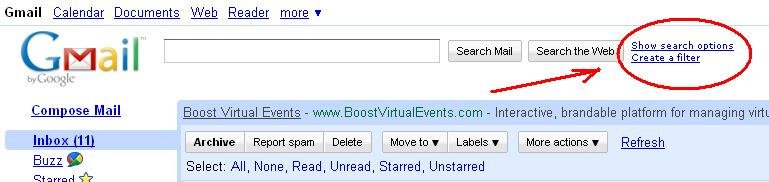
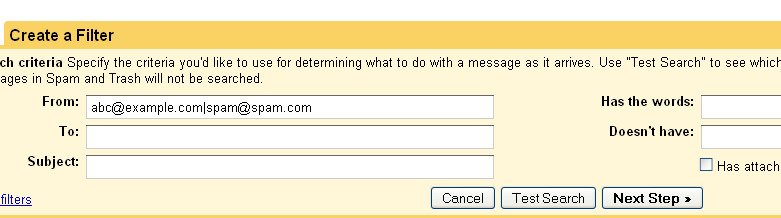
2. In the next window you can define your filter rules, e mail id of sender, recipients, Subject, Keywords etc. If you want to block e mail from multiple senders separate the e mail ids with “|” (Shift+back slash) i.e abc@example.com|xyz@example.com. If you want to block the email from an entire domain enter the site address in the “from” field. Click Next.
3. Choose the action to be followed on messages that match the criteria you specified. You can Archive, Mark it as read, Star, Apply a label, forward to an e mail id, Delete, or skip from Spam.
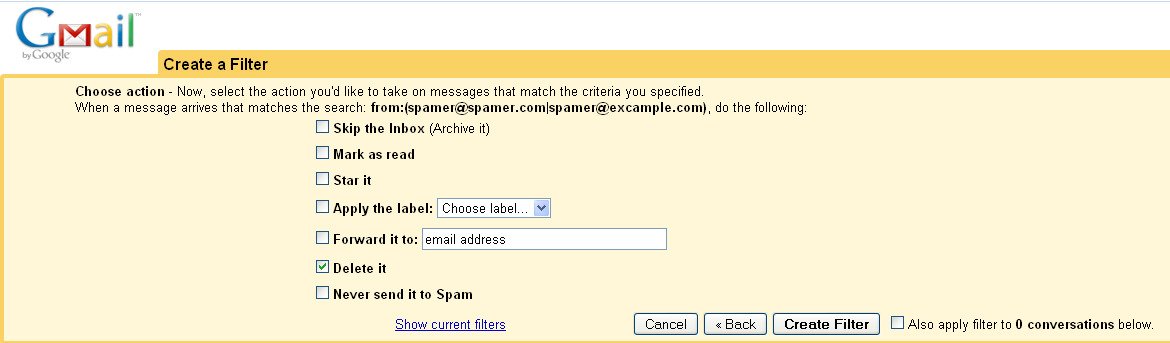
If you select the option “delete” the filtered messages will automatically deleted, it will not even go to Spam folder. Next click “Create filter”.
Remember: This method will not prevent the sender from sending mails, at least you can stay away from reading the mails.
RELATED POSTS
View all


Calling back to an anonymous number would lead your SIM being cloned- Another baseless story from TOI
July 4, 2012 | by techlineinfo.com
Apple to Unveil Wireless Printing Technology This November
September 25, 2010 | by techlineinfo.com