How to remove the blogger banner and change the default favicon of blogspot blogs

Here sharing the customization tip to remove the blue banner of  blogger (blogspot)  and the default favicon from your blogspot blog. This will certainly give a professional look to your blog.

Remove the blogger  banner

blogspot baner

1.     Login to your Blogger Dashboard and on “Layout” select ” Edit HTML” as displayed in the figure. (It is highly recommended to backup your template file before editing.

1

2.     Search for the line ” /* Variable definitions “ in the template file

3.     Insert the following code just before that  as shown

#navbar-iframe {
display: none !important;
} 
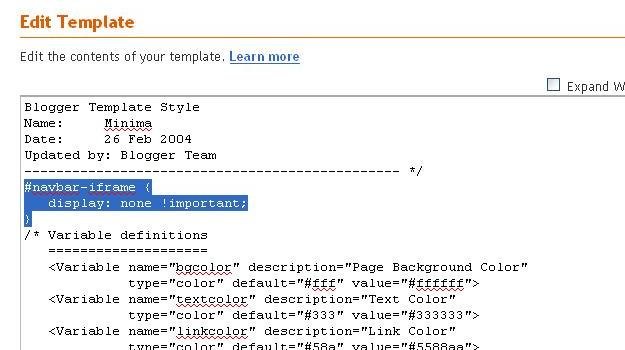
2

6.    Save the Template and view the changes in your blog.

See this video tutorial also

Change the default favicon

favicon

1.     Follow the first and second steps as in the previous case

2.    Goto iconj.com to make your favicon and get the direct link of your icon as shown.
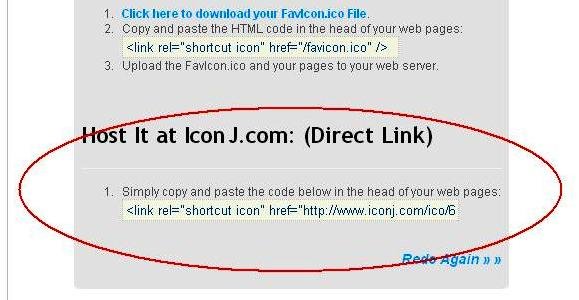
iconj

3.    locate the tag “</head>” in your template HTML file and insert the link of favicon just before that

4

4.     Save the template and now view the blog.

It is understood that since the removal of  blogspot Nav bar is the violation of  Google TOS, the blog may get banned. Do this at your own risk.


Related Posts with Thumbnails
5 Comments Post a Comment
  1. Carrie says:

    Your review was very helpful and I was FINALLY able to get my favicon to show up after following your directions. However, two days later it’s disappeared! Now it’s just the internet icon with the paper in the background. Any suggestions to fix this? Also, my url is http://www.carrieleighanna.blogspot.com.

    [Reply]

    Admin Reply:

    Repeat the steps once again. Have you changed the theme? For each theme you have to change the favicon

    [Reply]

  2. Melvin says:

    Hi, thanx for the info, but unfortunally it helped me partly.

    My blog has the favicon I want, but when refering from my other domain it shows the blogger favicon. Check it:

    http://www.kluptropicana.nl/
    http://kluptropicana.blogspot.com/

    Do you have any suggestions?
    Thanks in advance!

    Melvin

    [Reply]

  3. Victory! Victory! Victory!

    I have been working on this for what seems like months! I’ve tried tons of old instructions that didn’t work and this finally did. Many thanks! Now, I just hope it stays there!

    [Reply]

  4. michelle says:

    it worked!! thank you!! one follow up Q … the blogger favicon is still showing up next to comments. i either want MY favicon to show up there or NO favicon. any ideas of how to do this? i’ve been searching online for the answer and nothing is coming up! thanks in advance …

    [Reply]

Leave a Reply