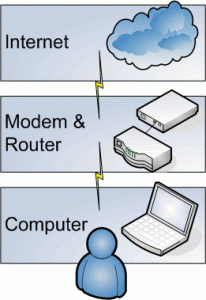
There are two ways to configure an ADSL modem for broadband connection. One in PPPoE (Point to Point Protocol over Ethernet) and the another is Bridge mode.
PPPoE Mode
In this mode the modem works as router and the PPPoE session terminates on WAN port of router. The PPPoE client is in built in the modem and allocated by BRAS server gets assigned to WAN port of modem. The Internal network has to use the private IP and for Internet access NATing happens in modem. In PPPoE mode the modem is configured in such a way that the user id and password are stored inside the Modem. Internet connection will be established as you switch on the Modem.
Bridge Mode
In this mode the modem works as transparent Ethernet bridge and therefore you need to run the PPPoE client software ( for login authentication) on your PC/server. WIN XP systems have this feature inbuilt but for other operating systems you need to buy it from market. Some freeware like RASPPPoE, Enternet etc. are also available on the Internet.
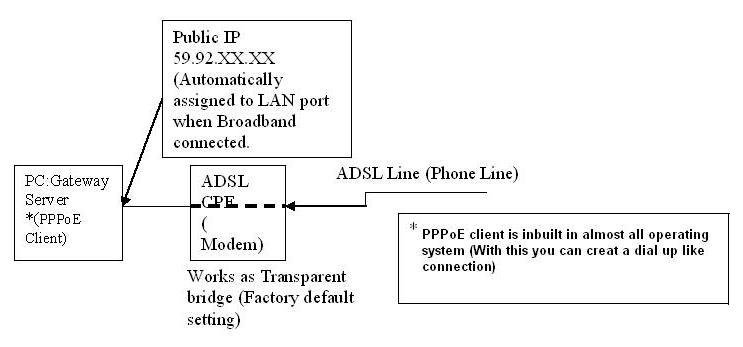
Both the modes can be used as per the requirement and application. Here enumerating the main differences
PPPoE mode
- User id and password stored inside the Modem.
- Multiple PCs can be connected. For example most of the basic ADSL Modems having at least one ADSL port and one USB port. In PPPoE mode, can connect one PC to Ethernet port and one PC to USB port which enable simultaneous internet usage in both the PCs.
- PPPoE mode is more secured.
- For Torrents download, appropriate ports need to be forwarded.
Bridge Mode
- In bridge mode user id and password to be entered in the dialer of computer.
- Only single PC can be connected.
- For torrents download port forwarding is not required.
- Less secured because all the ports are open need good firewall to avoid virus infection.
{ 15 comments… read them below or add one }
how to configure bsnl provided static ip on adsl modem to ubuntu server Operating system
please do send the soluton.
thanks
regards
sachin verma
netzone dehradun
Which Modem you are using? In PPPoE mode you you can enter the static ip in configuration settings.
HI
can i use same thing without dialer ?
No u can’t use same for internet at same time
I have two computers in two locations having a distance of 2kms as appx I have a bsnl landline connection at both the locations with the same.number and one bsnl.I’d and password I want to browse internet at.both the locations at the same time please suggest. Thanks in advance.
My wifi is fast in bridge mode, but how to use bridge mode with iPad and where to enter user name and password. Please help
Heman
Dear sujith,
can you explain what is the difference between pppoe and bridge mode in simple words for non it background and please explain which mode should i select for bsnl
my modem is iball wirless
rejoice
kottayam
Use PPPoE mode to use WiFi. In PPPoE mode, the router will dial and make connection automatically whenever you switch ON the modem. You need not to setup the dialer in PC. To terminate internet connection just power off the router.
Dear Sujith Sir,
Can I use broadband modem UT300R2U for desktop computer (through USB) and for Laptop (through Wireless LAN) simultaneously. If not possible, please guide me to effectively utilise my modem for both. How can I overcome the situation? Please help me. Thank you.
UT300R2U doesn’t support WiFi. You can use USB port for PC and LAN port for Laptop or vice-versa. Just configure the Modem in PPPoE mode (Go through this http://www.calcutta.bsnl.co.in/dataoneinstall/pppoe04a.html). You can use both the devices simultaneously.
I have netgear WGR 614 router and probably reliance supports bridge mode, is there any way I can configure modem or router to support PPPOE mode.
Response will be appreciated.
Thanks
Mahesh Vyas
sir,is it possible to run 2 pppoe dialer from 2 different pc on one modem(connected to switch).
I have two computers in two locations having a distance of 1kms as appx I have a bsnl landline connection at both the locations with the same.number and one bsnl.I’d and password I want to browse internet at.both the locations at the same time please suggest Sujithsir
How it’s possible to have two connection with same number? BSNL broadband connections are port bounded means because each broadband id is specifically tied with the telephone number associated with that, hence it is not possible to use a single broadband account for multiple telephone connections. However with BSNL pre-paid broadband connection, you can have access from multiple locations
how can i forward port in my resdential router 1600 plz help me