Here the method to access and control your PC from your mobile phone.Through this you can access and edit your files, start and stop applications, control your mouse, keyboard and another devices. All these things facilitate through a free application JM2PC java Mobile to PC.
Requirements
A mobile phone that’s support Java applications (MIDP 1.0) – GPRS , EDGE or Bluetooth
at least 70 KB of available storage
A desktop or laptop computer with Java (JRE) version 1. 6 or superior. You can download it here.
[download id="6"]
Running JM2PC Server:
Windows:
Run the file “RunServer_windows.bat”
Linux:
Add execute permission and run “runServer_linux.sh” file.
Example:
$ cd <JM2PC Server installation path>
$ chmod +x runServer_linux.sh
$ ./runServer_linux.sh
Other OS:
Execute the command line:
java -Djava.library.path=.:./lib/comm:./lib/jsr-82 -cp .:./lib/JM2PCServer.jar:./lib/JM2PCommand.jar:./lib/comm/commLinux.jar:./lib/jsr-82/your_JSR82_implementation.jar jm2pc.server.gui.StartServer
JM2PC Server Configuration:
Language: select the language of JM2PC Server’s GUI
Save Log: enable/disable save log to files
Timeout (min): timeout (in minutes) of JM2PC Client sessions. It can be a value between 0 and 60. A timeout of zero is interpreted as an infinite timeout.
select the Blue-tooth connection type and JSR-82 mode
Password: choose a password to protect your server.
Click the Start button. A message will be displayed indicating the successfully of the operation and the server is waiting for the clients.
JM2PC Client configurationĀ on Mobile
Download JM2PC_Client.jarĀ and upload the files to your wireless hand held using a USB cable, infrared, or bluetooth.
Select JM2PC Client from applications menu on your mobile phone.
1 – Select (options -> New)
2 – Select connection type – Bluetooth
3 – Select configuration type Automatic (Recommended) or Manual
4-Wait while JM2PC BT Client searches for a Bluetooth device with SPP and JM2PC Server.
5-After the search is completed, a screen with a list of available Bluetooth Serial Port Profile will be shown. Select the correct service (you can select options -> Info to get more information for each service).
6 – After you select a service, a screen with all server’s information will be shown. You only need to enter the password (the same of JM2PC Server).
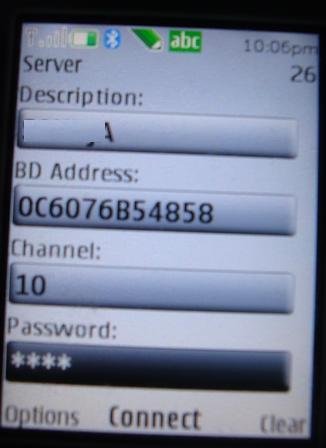
7 – Select (options -> Save) to store this server’s profile on the mobile.
8- Back to the server’s list. Now you have a new server on the server’s list. Select (Options -> Connect) to start a connection to the server.
9 – After connection established, a screen with the list of functions will be shown. Get the complete user’s guide at https://sourceforge.net/projects/jm2pc/ to learn how to use all functions.
Plug-ins
Plugins help your JM2PC perform specific functions like direct access and control hardware plugged on you computer (like webcam, printers, etc) or fastest control of specific software.
You must install plugin on JM2PC Server and the JM2PC Client load the plugin’s list after establish a connection.
ATTENTION: You need to be a registered user to access plugins in JM2PC Client.
See this video Demo
These may also help you
Tagged as: bluetooth, JM2PC, pc mobile remote control
{ 16 comments… read them below or add one }
Dear Walter,
I followed the instructions too times, but in JM2PC_Client I couldn’t see the option Bluetooth (only the option Internet). My mobile is Samsung GT S5230, please help me.
Thanks a lot.
Hi,
Try this http://sourceforge.net/projects/jm2pc/files/Client/JM2PC_BT_Client.jar/download and install in your mobile
Hi,
I am try tihs application on Simulation..
But it is not connect through Bluetooth..
It will give Error as a btspp: connection Fail..
plz give me answer how to sovle this error in Bluetooth connecation in simulation…
Can you elaborate a little bit? How did you simulated?
Thnaks a lot for reply to me..
Sir,
I am running JM2PC BT client in netbeans using Micro platform SDK 3.0 .
And Sever JM2PC server is running on eclipse.
server is running on jsr 82 mode.
but when i am running JM2PC client and connect with server using my Laptop BD address it will give error:: Can’t make the connection:Error in btspp:: connect() on mobile emulator.
and give error on console like this..
javax.bluetooth.BluetoothConnectionException: Error in btspp::connect ()
at com.sun.jsr082.bluetooth.btspp.BTSPPConnectionImpl.doOpen(), bci=61
at com.sun.jsr082.bluetooth.btspp.BTSPPConnectionImpl.(), bci=64
at com.sun.jsr082.bluetooth.btspp.BTSPPConnectionImpl.(), bci=4
at com.sun.jsr082.bluetooth.btspp.Protocol.clientConnection(), bci=24
at com.sun.jsr082.bluetooth.BluetoothProtocol.openPrimImpl(), bci=32
at com.sun.jsr082.bluetooth.BluetoothProtocol.openPrim(), bci=14
at com.sun.midp.io.j2me.btspp.Protocol.openPrim(), bci=7
at javax.microedition.io.Connector.openPrim(), bci=327
at javax.microedition.io.Connector.open(), bci=3
at jm2pc.client.JM2PCMIDlet$1ConnectThread.run(JM2PCMIDlet.java:175)
I have not mobile for runing this applicaton on hardware..
So i am running this on Emulator..
My Laptop has Windows Vista.
Plz sir give me a reply it’s possible to simulate this on same Laptop without using Mobile hardware.
Thanks..
Hi Kiran, I have tested the application in my Nokia mobile phone (See the photographs) not tested in a simulated environment. I will check the possibility to test in the simulator. I think it will be difficult to test the application in simulation because the problem in using the same Bluetooth hardware for both PC and the simulator application. Anyway I will try.Stay tuned I will post the update here. Thanx
Thanks for reply..
Sir,
I am also tryed to run between two PC.
But same problem occured..
Hello sir,
I have A download JM2PC server software and unzip But when I Run the runServer_Windows.bat file.
Error Msg Display in dialog box
“Could Not Find The Main Class.Process Will exot!”
I Have Complete All Requirement About JAVA Related But This Error Msg is display.
Plz sir give me a reply
and How TO Run This Application.
Hi,
Himanshu
U try this…
http://sourceforge.net/projects/jm2pc/files/
It is working.. i am also used it..
Thanks For Reply,
kiran
But Problem is Not Solved.
When I started Application JM2PC Server
and try to runServer_Windows.bat file And Error Display in JAVA Vertual Machine lancher Dialog box
error Could not find the main class. programe will exit!!
thanks for reply
Hi, Himanshu
I think some problem with your Java installation. Uninstall the version you have installed and install the JRE as per your operating system from here
Hi, Sir
I am using LG KP500 mobile phone for JM2PC BT Client.but when installing jar it’s givine error. Not supported…
LG KP 500 compartable or not…
Thanks
Respceted sir,
Please tell me how to run Plugins with JM2PC. i am not getting what is done by using driectkey and camera key. If i am selecting parameterand directkey plugins a after what is the output of this plugins. please give me details of both plugins .
Thnaks a lots
sir i want to connect the jm2pc server in net beans tell me the procedure its very urgent
HI,
i have a little bluetooth device and installed jm2pc server in my pc. its successfully installed. and i have installed jm2pc BT client on my phone its successful installed.my pc config is win7 x64.
Now the problem is following image:
http://i55.tinypic.com/dxbod5.jpg
I have got the same problem.
My solution: run “RunServer_windows.bat” through Total Commander.