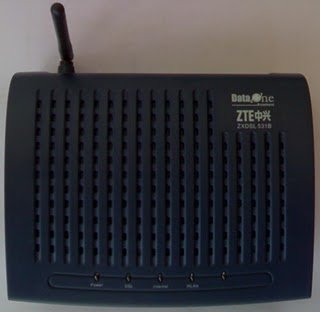
Configure ZTE ZXDSL 531 (TYPE-2) 4-LAN/Wireless LAN Modem for BSNL broadband

by Sujith on 01/09/2010

ZXDSL 531B 01 Configure ZTE ZXDSL 531 (TYPE 2) 4 LAN/Wireless LAN Modem for BSNL broadbandZTE  ZXDSL 531 is a type 2 Modem supplied by BSNL with 4 Lan and WIFI. This is a comparatively cheap and best Wifi modem. The cost of this Modem is 1600/- if purchased through BSNL. Here the method to configure this Modem in bridge and PPPoE mode.

Connect your Modem and computer through the supplied Ethernet cable.

Open your browser and type http://192.168.1.1. Now a pop up window will come up. Enter the user name “admin” and password “admin”

After loging in click “Advance setup” in the left side of the page. Then a table will be shown. check the check box in the first row showing pvc 0 under the head remove, then click Remove button at the bottom.1 Configure ZTE ZXDSL 531 (TYPE 2) 4 LAN/Wireless LAN Modem for BSNL broadband

Click Add, ensure the vci value as 35 , click Next.
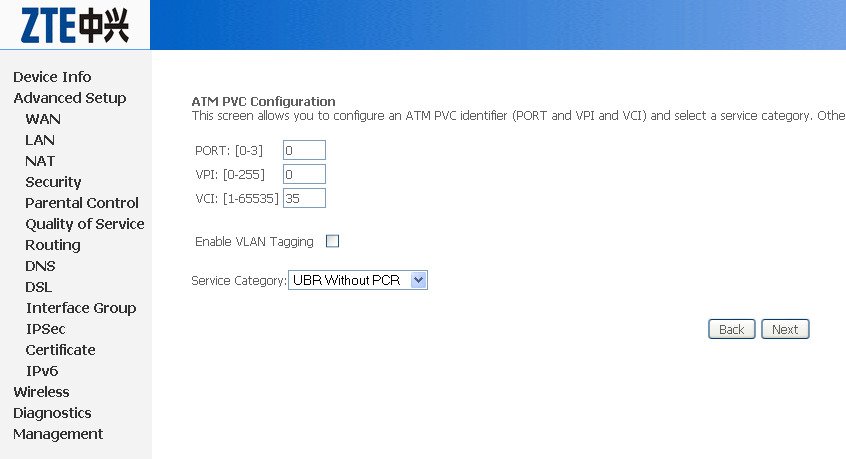
2 Configure ZTE ZXDSL 531 (TYPE 2) 4 LAN/Wireless LAN Modem for BSNL broadband

For customers using dialer for broadband (Means user id and password to be entered in your dialer)

  1. Select the connection type as Bridging and encapsulation as LLC, click Next.

 2.    Click Apply/Save, the table again appears, click Save and Reboot at the bottom of the table, wait for approx. 3 min. to automatically reboot the modem. After the modem reboots, connect your broadband using the your broadband dialer.

3 To make a dialer, go to Control panel , Network connection > create new connection

For customer using Always On mode(PPPoE Mode)

This mode suitable for sharing the broadband connection for multiple users through Ethernet cable or Wifi. In this mode the user  id and password is stored inside the Modem and connection will be established by simply switching ON the modem. No  dialer is required.

  1. Select the connection type as PPPOE over Ethernet (PPPoE), click Next.

6 Configure ZTE ZXDSL 531 (TYPE 2) 4 LAN/Wireless LAN Modem for BSNL broadband

2.     Type your broadband user name, password provided by your ISP and service name as multiplay, click Next.
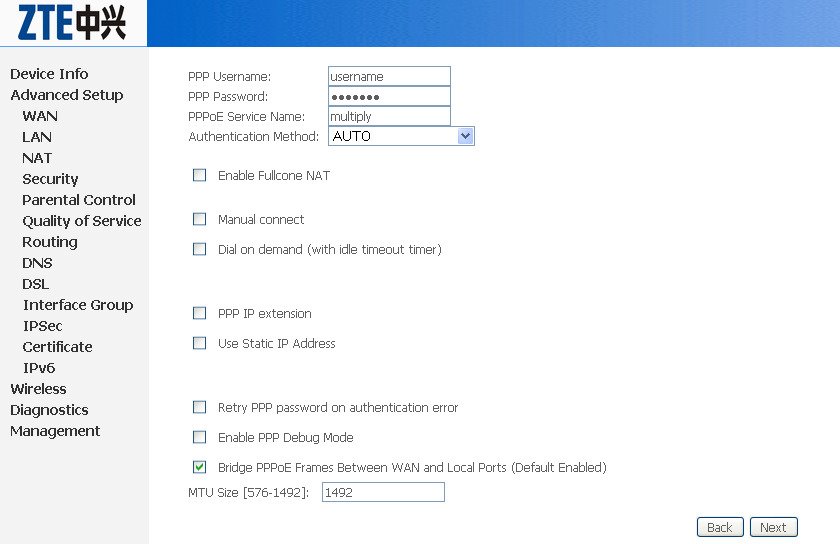
7 Configure ZTE ZXDSL 531 (TYPE 2) 4 LAN/Wireless LAN Modem for BSNL broadband

3.  Click next upto the last page, click Apply/Save.

4.   The table again appears, click Save and Reboot at the bottom of the table, wait for approx. 3 min. to automatically reboot the modem. After the modem reboots, confirm the stability of DSL light, after it becomes stable, you can start using your internet connection.

8 Configure ZTE ZXDSL 531 (TYPE 2) 4 LAN/Wireless LAN Modem for BSNL broadband


{ 175 comments… read them below or add one }

hEMANT jAGTYANI April 14, 2010 at 7:07 AM

thanks to guide meto config.my modem for net,will you explain in detail that how can I connect my wify leptop with my desktop for net.

Reply

B.Chandrasekar April 25, 2010 at 7:00 AM

Hello Mr.Sujith,

I am also having the above said modem(ZTE ZXDSL-531B) supplied by the BSNL. Kindly inform me how to connect the same to a laptop PC through the wi-fi method. Thanks.

–B.Chandrasekar, Kalpakkam, TAMILNADU.
E-mail: bcskal@rediffmail.com

Reply

Sujith April 25, 2010 at 7:07 AM

It is very easy to configure the modem. Configure it to PPPoE mode (always on mode) and enable the wifi. Connect the desktop withe LAN cable. If you have team viewer then I can help you in configuring the modem.

Reply

ishit May 5, 2010 at 9:27 AM

Sir, please help me to configure wifi… and i have teamviewer

Reply

Sujith May 5, 2010 at 12:26 PM

Hi, presently iam on move, will come back to u. Thanx.

Reply

Pawan May 15, 2010 at 5:40 PM

Sir,please help me to configure wi fi and i also have teamviewer

Reply

JAI PRAKASH June 11, 2010 at 8:14 AM

plz tell me that how to config.my modem (zte zxdsl 531b) for multi user connection at same time.i have bsnl broadband connection.
i need immediately help.
plz help me!

Reply

Sujith June 11, 2010 at 8:04 PM

@Jaiprakash

You have to configure the modem in PPPoE mode for multi user connection. Go through the above article again to configure your modem in PPPoE mode. in case of further problems please let me know.

Reply

Mukbir October 27, 2010 at 8:44 PM

I configure my modem in PPPoE. But it google & Orkut are open and u-torrent are working, any other website are not open.

what should i do?
please help me..

Reply

Arindam November 11, 2010 at 1:47 AM

I have configured Configure ZTE ZXDSL 531 modem as per the above guide , but only gmail and orkut is working , no other sire is opening. I have check all the IE options , but still could not open any page while using my modem in PPPoE with auto mode. I can only browse internet with bridge mode.

Reply

JAI PRAKASH June 13, 2010 at 1:05 PM

sir
thanks for ur reply.
i did it.
but its not successful.

Reply

Sujith June 13, 2010 at 1:08 PM

If you have team viewer I can configure it for you right now

Reply

JAI PRAKASH June 13, 2010 at 1:11 PM

yes sir,
i have teamviewer
but how u can configure it for me right now!

Reply

Sujith June 13, 2010 at 1:12 PM

Iam Online now I can do it from here

Reply

shatik June 22, 2010 at 9:21 AM

how can i make it a secured network, so that only a selected group of people can connect to internet using this modem ??

Reply

Sujith June 27, 2010 at 8:18 AM
akshit July 3, 2010 at 11:59 PM

sir i m still unable to configure my modem for always on it gets connected thru bridging but nt thru alwys on i want to use modem for both laptop nd mobile so kindly help me out i hv read ur complete guide i hv tried al the things from reset to default and all other things caled bsnl customer care they said it cant b done pls help me out asap

Reply

vaibhav August 4, 2010 at 8:42 PM

my zxdsl531 b modem No DSL Light within the BSNL broadband &The DSL LED is functional because it blinks once when Modem starts.

Reply

Sujith August 4, 2010 at 11:29 PM

Hai Mr Viabhav. I think there is no problem with you Modem. The fault is with your line or with tele exchange. Book the fault in your local exchange.

Reply

anwar August 12, 2010 at 1:39 PM

hiiii im having zxdsl 531B modem
i wana use net on my cellphone as well as on laptop via wifi netwrk . its working on laptop bt on cellphone it saying no “gateway reply”
so plz let me know the step of modem configuration for using net on cellphone
using incription key for security perpopse…….

Reply

Sujith August 12, 2010 at 1:43 PM

Hi Anwar,
Go to this post http://www.techlineinfo.com/wifi-configuration-and-security-settings-of-zte-zxdsl-531-adsl-modem/ for detailed information regarding the security settings. In case any doubt please come back.

Reply

anwar August 12, 2010 at 2:03 PM

thknk u im looking for it……….

Reply

anwar August 12, 2010 at 2:07 PM

bt in these step where is should submit my username n password…..

Reply

Sujith August 12, 2010 at 2:10 PM

whenever you type http://192.168.1.1 in browser a popup window will come. Just enter admin/admin

Reply

anwar August 12, 2010 at 2:14 PM

im asking about my username and password which i uaualy submit when i try connect to internet. which r provided by BSNL

Reply

anwar August 12, 2010 at 2:11 PM

there is a option of WEP Encryption: disable or enable ….?which i shud select
n if im selecting enable it asking some Encryption strength :128 or 64 bit

Reply

Sujith August 12, 2010 at 2:21 PM

I think you have not configured your modem in PPPoE mode. In PPPoE mode you need not to dial from PC to establish the connection. Do you have Gmail id? if so come to gtalk. I can guide you or login to your yahoo mail account.

Reply

KAUSHAL JOSHI September 24, 2010 at 8:21 PM

thank

Reply

ratan September 30, 2010 at 6:33 PM

configure the modem in PPPoE mode for multi user connection but not working

Reply

Sujith September 30, 2010 at 6:38 PM

It’s working. Repeat all the steps again. If you have Yahoo messenger submit your id in contact form

Reply

ratan September 30, 2010 at 6:35 PM

plz help me…

Reply

maddy potter October 2, 2010 at 11:16 AM

i’ve connected ma mobile to zte zxdsl5631 b modem using wifi connectivity… still the main webpage i’ve mentioned as default i.e “www.google.com” is not getting opened… can anyone help me to connect to internet….??

Reply

Sujith October 2, 2010 at 11:57 AM

Check connectivity and browser settings of your mobile handset. Which mobile you are using?

Reply

shiv October 5, 2010 at 12:14 AM

Sir.. I want to connect my n97 with zte modem.. it shows that it is connected but when i write name of any site it displays INVALID SERVER NAME …please help.

Reply

Siju George October 26, 2010 at 3:20 PM

Nice guide to configure ZTE ZXDSL. Any way do you know why BSNL is using VCI value as 35. At first I tried to configure it as 38 and got error message. When I call the support they said they don’t know why BSNL require us to use the value 35. Any thoughts ?

Reply

shahbaz November 13, 2010 at 2:03 PM

i need wifi for ptcl sevies

Reply

MUJJU November 22, 2010 at 9:24 PM

sir, please suggest me the best commany type2 modem for bsnl broadbad ,first thing i want high in grasping signals to my laptop second thing i want durabale and reasonable in price. b’coz iam suffering a lot. for this act i will be thankfull to you sir.

Reply

Sujith November 22, 2010 at 9:33 PM

You can go for D link or Netgear. There are several factors affect the range of wifi such as position of router, obstructions etc. You can purchase the type 2 router from BSNL also. It’s very economical (Rs 1200/- only) you will not get a router in open market at this cost. I have been using ZTE ZXDSL 531 type 2 Wireless router for last one year without any problems.

Reply

shrenik January 10, 2011 at 4:46 PM

I have configured my modem but the wifi is not working
and also now the gateway site is not opening
please help

Reply

Prabhakar Sharma January 19, 2011 at 5:49 PM

I have configured Configure ZTE ZXDSL 531 modem as per the above guide , but only gmail and orkut is working , no other sire is opening. I have check all the IE options , but still could not open any page while using my modem in PPPoE with auto mode. I can only browse internet with bridge mode.

Reply

Sujith January 19, 2011 at 6:12 PM

Change the MTU value to 1442 or 1452 (Settings available in the same page where you are entering userid and password in PPPoE mode). If it is not working repeat the steps after resetting the modem to Factory set.

Reply

Gautam Mohan February 24, 2011 at 12:22 PM

Dear Mr Sujith,

I have a modem ZTE 531B issued by BSNL. Can I use the same modem for MTNL in delhi. I already have a connection however the MTNL authorities have been unable to configure my modem.

May request for your assistance if its possible to configure the modem.

Thank you.

Reply

Sujith February 24, 2011 at 12:31 PM

Yes Gautam, You can configure it for MTNL also. Only the VPI/VCI settings are different. Use 0 and 32 for MTNL. Rest everything same as BSNL. If you have any further problem you can contact me.

Reply

Gautam Mohan February 24, 2011 at 2:22 PM

Dear Sujith,

First of all thank you for your prompt reply. Net has got connected through lan cable but how do i get the wifi mode to work. Should I go to mtnl site & try from there , because if i am typing 192.168.1.1 directlty , site is not opening.

Please help thank you.

Gautam.

Reply

Sujith February 24, 2011 at 2:26 PM
Gautam Mohan February 24, 2011 at 3:19 PM

Dear Sujith,

I have set all the fields as per the link forwarded by you but still i am not able to connect wirelessly. there is only one connection & it is saying “The settings saved on this computer for the network do not match with the requirements of the network”!!

What do I do next??

Reply

Sujith February 24, 2011 at 3:32 PM

Which operating system you are using ? If it is Windows XP SP2, then use WPA-PSK instead of WPA-2 PSK under Wireless security. Still you are facing any problem, now I am online just download the software Show My PC from this link (http://download3.showmypc.com/ShowMyPC3055.exe) , so I can access your PC from here to configure.

Reply

Gautam Mohan February 24, 2011 at 7:26 PM

I could only get online from another computer. can i just get back from the basics?? Are you online now?

Reply

Gautam Mohan February 24, 2011 at 7:36 PM

I am using windows 7.

Reply

Sujith February 24, 2011 at 7:42 PM

Then that will not be an issue. I have sent an gtalk invitation. You come on Gmail chat. If you have skype can come on Skype . My Skype id
sujithkk1

Reply

NAVVEN February 27, 2011 at 10:24 PM

SIR PLS TELL HOW GET THE WIFI CONNECTION TO THE PHONE FOR USING THIS MODEM

Reply

Sujith February 27, 2011 at 10:26 PM
Gautam Mohan March 5, 2011 at 7:58 PM

Hello Sujith,

I am in chandigarh & was trying to configure my nokia siemens residential router 1600. I changed all the settings necessary . It connected initially but then its not connecting without lan cable.

what should i do??

Thanks in anticipation.

Reply

gautam mohan March 8, 2011 at 11:28 AM

Hello Sujith,

Mai i request you for a response for the problem i am facing.
thank you

Reply

vijay March 13, 2011 at 1:19 PM

Hi Sujith,

I have ZTE ZXDSL 531B Type 2 Modem cum router. Previously I was using BSNL but currently I’m using BEAM Cable which supplies Internet over Ethernet cable (RJ45)

Can I use this same modem cum router for Wifi Internet access? If so please let me know the settings to be done.

Thanks in Advance,

Vijay

Reply

Sujith March 13, 2011 at 2:08 PM

Can you provide IP details of your router. Go to Start>RUN>CMD then type ipconfig/all. Now please post the result here.

Reply

vijay March 13, 2011 at 2:25 PM

Hi Sujith,

My Router IP is 192.168.1.1

Regards,
Vijay

Reply

Sujith March 13, 2011 at 2:38 PM

I am speaking about the IP of your Beem router. I think Beem is using Optical Fiber system for Broadband connections.
I am not sure, whether it is possible or not, however you can have try. Connect your ZTE router to a PC using LAN cable. Go to http://192.168.1.1/lancfg2.html this link. enter user id and password. In the config page disable the DHCP. Then you have to enter the iP range. Save settings. Go to Wireless menu (http://192.168.1.1/wlswitchinterface0.wl) , Enable the wireless. Go to security settings and enter the required settings. Save and reboot.
Plug your RJ45 cable from Beam router to one of the RJ 45 ports.
Check whether it is working or not.

Reply

vijay March 13, 2011 at 3:23 PM

Yes, Beam is using Optical Fiber System.

Just now I’ve connected the LAN cable to one of the RJ45 and used Bridge as the Connection Type. Using that I was able to connect to only one Laptop but not with my another laptop.

If possible could you help me out to connect Internet over Wifi?

Reply

Sujith March 13, 2011 at 3:30 PM

Sent you a mail Come for Gtalk

Reply

vijay March 13, 2011 at 3:38 PM

im online sujith

Reply

vijay March 14, 2011 at 2:53 PM

Thanks alot Sujith now everything is working fine. And the Single machine in network problem is from my ISP only.

Reply

Ashish Mahajan March 24, 2011 at 3:11 AM

Hi

I have recently switched over to internet connection from Reliance. Prior to this, I was using BSNL wireless broadband through ZTE ZXDSL 531 B modem. The internet connection that I have now is a cable connection i.e. phone line gets directly connected to the modem & then from the modem, a network cable is connected to my laptop.

I need your help in configuring the modem so that I can use my Reliance internet connection as wifi internet through the modem.

Reply

Vivek May 10, 2011 at 12:44 AM

Hi Ashish, I am also facing the same issue. Some one told me that its not possible to use BSNL WiModem with Reliance as both works on different technologies. Though BSNL WiModem can be used easily with Airtel connection. Requesting Sujith to share his thoughts on it.

Reply

Vivek June 12, 2011 at 12:19 AM

Hi Sujith, do you have any clue on my above comment or should I go ahead and buy a new WiModem :-(

Reply

Sujith June 12, 2011 at 12:28 AM

I think Reliance is using a Web based Login Procedure to PPPoA or PPPoE based authentication so normal routers will not work for. Which Modem you are using for Reliance? Are you using the web based application for authentication?

Reply

Vivek June 14, 2011 at 6:33 PM

I am using some ZTE modem with the my Reliance broad band connection. Yes, I am using the web based application for authentication, may be thats the reason why I am not able to use my BSNL WiModem. BTW, I bought a new belkin N150 router (Part no. F7D131ZB) (price – 1400 – Banaglore). Initial experience with router is awesome – as didnt have to put in any extra effort to configure it. Just plug n play.

Reply

suneet March 25, 2011 at 9:39 AM

i was trying to make enable wifi in the dsl router
but some thing wrong happened
than by mistakely i make restore by default
after that dsl yellow light is coming and internet green light is also coming but unable to connect internet through dial up ( it shown some mistake of modem not responding)
please help me in this regards
is there is any back file which i can restore ( which make on earlier setting)

Reply

Naman Rajpal April 15, 2011 at 3:32 PM

sirshud i enable firwall at the lasyt page where it asks about NAt enabling and FIRE wall enabling???

Reply

Subhash June 11, 2011 at 6:32 PM

hi sir i’m online now and my email is subhashrockx@gmail.com and i need a help from u i’ve followed st step and i cant find pvc o so plz help me i’ve team viewer too and i’ve scanned for wifi networks i got zte and it asks security key but i dont what is it if type any thing it says key mismatch…..so plz help me sir or mail me the solution i’ll check it daily

Reply

Sujith June 11, 2011 at 7:04 PM
harsimran singh June 17, 2011 at 5:44 PM

sir, i want to run wifi on my mobbile thru bsnl wifi modem(ZTE 531b), but where shud i get the option of entering the username and password as i enter it in my computer .

Reply

Sujith June 17, 2011 at 6:50 PM

Your mobile model? Moreover you have to configure the Modem in PPPoE mode (Always on Mode) means your user id and password will be stored inside the modem and your net connection will be made through automatically as soon as you switch ON the modem. In this mode you need not to dial from PC.

Reply

Venkat June 19, 2011 at 6:13 PM

Dear Sujith
I am using BSNL wireless modem. The engineers from BSNL have configured the modem as “default” I would like to give a name say “Nugget” . How to do this rename change.\
thanks
venkat

Reply

Sujith June 21, 2011 at 3:09 PM
Kiran Parmar June 25, 2011 at 7:52 PM

i have bsnl modem ( zxdsl 531B). I am unable to connect desktop and iphone 4 simulataneously. I already set up modem on pppoe mode as per your tutorial.

Reply

Sujith June 25, 2011 at 7:54 PM

What error you are getting?

Reply

sumit June 27, 2011 at 4:23 PM

Hello,

Can anyone help me to connect my Nokia E63 With wifi with ZTE modem…..

I know PPPoE method…but i don’t want to do that type…..

i want to change my ip address after some min..

can anyone help me out..

thanks

Reply

akshay July 1, 2011 at 6:56 PM

hello sujith sir,
i want to change the “admin” password which we use when loggin in 192.168.1.1 to something else i like.
plus i also want to change the password provided by the BSNL guys which they set as Broadband connection “WAN MINIPORT (PPPOE)”. they said that i can change password but not the user id

Reply

Sujith July 1, 2011 at 7:07 PM

Hi Akshay, Go to the “Access Control” Sub menu under “Management” menu. Click “Passwords” link. Else you click this link http://192.168.1.1/password.html to change the default “Admin” password of the modem.
You will not be able to change the user id supplied by BSNL, but you can change the password. Go to http://www.dataone.in for that

Reply

akshay July 1, 2011 at 7:44 PM

Thank You Sir sooo much! i succsessfully changed the admin passwrd.
i assume keeping default ‘admin’ as username and password of login as a security risk….
hope the reset button under the modem will help if anything goes wrong
thank u once again,

Reply

Abhilash July 3, 2011 at 6:14 PM

Is It Possible to control the speed of Wifi for any connected system,I have a PC connected via ethernet and a lappy connected via wifi, can i grant it a speed 250Kbps maximum for the Lappy or vice versa

Reply

rohit July 10, 2011 at 10:30 PM

sir pl tall me to what is my modem proxy address,port.

Reply

Sujith July 10, 2011 at 10:33 PM

Can u elaborate more..U need not require proxy

Reply

akshay July 11, 2011 at 4:39 PM

sir i urgently need your help right now,
i’m installing a game and it gave me following options:
==============================================================
please select the correct internet connection speed for your computer.
modem – 14.4k
modem – 28.8k
modem – 56k
ISDN – 112k
DSL > 256k
DSL > 768k
LAN/T1 > 1M
==============================================================
I AM USING ZTE ZXDSL 531 (TYPE-2) 4-LAN/Wireless LAN Modem for BSNL broadband MODEM RIGHT NOW and Sppedtest.net is showing my speeds as:
ping: 91ms
download speed: 55 kB/s
upload speed: 49 kB/s
Which speed to choose?

Reply

Sujith July 11, 2011 at 4:43 PM

I think you are using BSNL 512 Kbps (64KBps) unlimited plan broadband connection. You can go for DSL > 256 Kbps option

Reply

Leave a Comment

*

Previous post:

Next post: