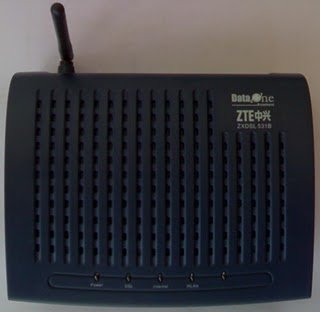
Configure ZTE ZXDSL 531 (TYPE-2) 4-LAN/Wireless LAN Modem for BSNL broadband

by Sujith on 01/09/2010

ZXDSL 531B 01 Configure ZTE ZXDSL 531 (TYPE 2) 4 LAN/Wireless LAN Modem for BSNL broadbandZTE  ZXDSL 531 is a type 2 Modem supplied by BSNL with 4 Lan and WIFI. This is a comparatively cheap and best Wifi modem. The cost of this Modem is 1600/- if purchased through BSNL. Here the method to configure this Modem in bridge and PPPoE mode.

Connect your Modem and computer through the supplied Ethernet cable.

Open your browser and type http://192.168.1.1. Now a pop up window will come up. Enter the user name “admin” and password “admin”

After loging in click “Advance setup” in the left side of the page. Then a table will be shown. check the check box in the first row showing pvc 0 under the head remove, then click Remove button at the bottom.1 Configure ZTE ZXDSL 531 (TYPE 2) 4 LAN/Wireless LAN Modem for BSNL broadband

Click Add, ensure the vci value as 35 , click Next.
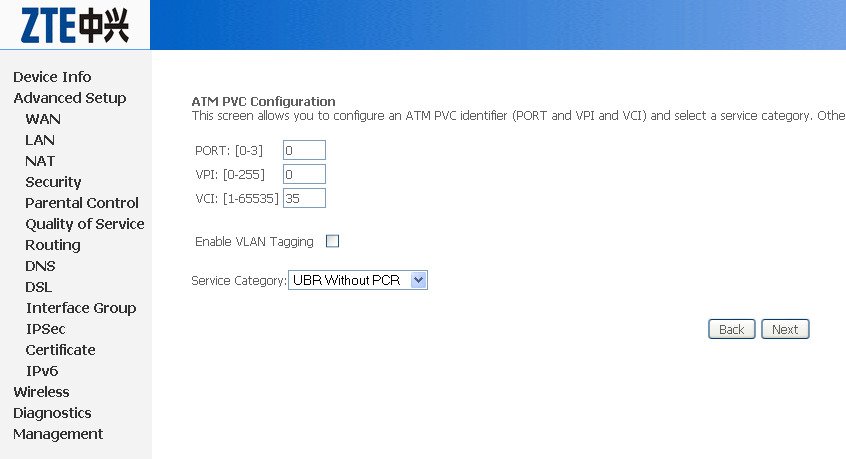
2 Configure ZTE ZXDSL 531 (TYPE 2) 4 LAN/Wireless LAN Modem for BSNL broadband

For customers using dialer for broadband (Means user id and password to be entered in your dialer)

  1. Select the connection type as Bridging and encapsulation as LLC, click Next.

3 Configure ZTE ZXDSL 531 (TYPE 2) 4 LAN/Wireless LAN Modem for BSNL broadband 2.    Click Apply/Save, the table again appears, click Save and Reboot at the bottom of the table, wait for approx. 3 min. to automatically reboot the modem. After the modem reboots, connect your broadband using the your broadband dialer.

5 Configure ZTE ZXDSL 531 (TYPE 2) 4 LAN/Wireless LAN Modem for BSNL broadband

3 To make a dialer, go to Control panel , Network connection > create new connection

For customer using Always On mode(PPPoE Mode)

This mode suitable for sharing the broadband connection for multiple users through Ethernet cable or Wifi. In this mode the user  id and password is stored inside the Modem and connection will be established by simply switching ON the modem. No  dialer is required.

  1. Select the connection type as PPPOE over Ethernet (PPPoE), click Next.

6 Configure ZTE ZXDSL 531 (TYPE 2) 4 LAN/Wireless LAN Modem for BSNL broadband

2.     Type your broadband user name, password provided by your ISP and service name as multiplay, click Next.
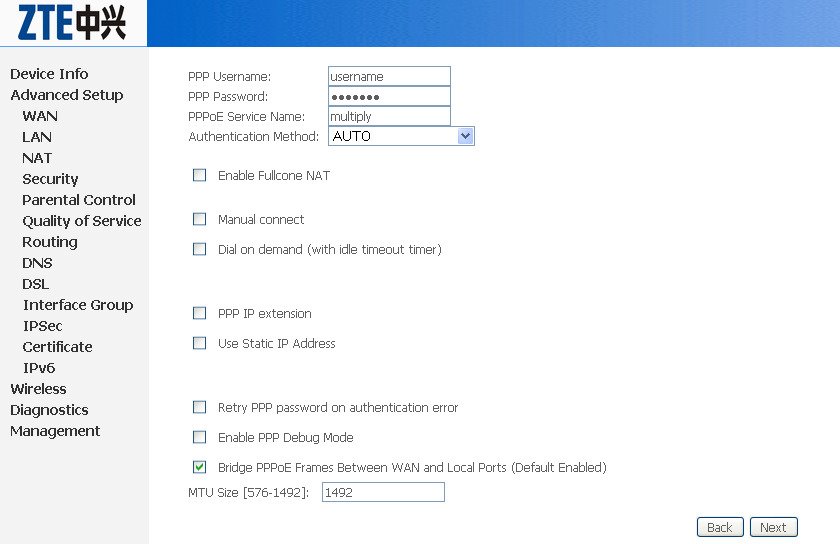
7 Configure ZTE ZXDSL 531 (TYPE 2) 4 LAN/Wireless LAN Modem for BSNL broadband

3.  Click next upto the last page, click Apply/Save.

4.   The table again appears, click Save and Reboot at the bottom of the table, wait for approx. 3 min. to automatically reboot the modem. After the modem reboots, confirm the stability of DSL light, after it becomes stable, you can start using your internet connection.

8 Configure ZTE ZXDSL 531 (TYPE 2) 4 LAN/Wireless LAN Modem for BSNL broadband


{ 151 comments… read them below or add one }

akshay July 15, 2011 at 10:28 PM

thank you sir very much for helping me twice before.
this time, my sister cannot connect to the internet via her seperate user account
i am using win 7 ultimate with my accout having admin privilages
my sister’s account is a user and without admin privilaeges
i cant see the broadband connection option in her account
please help

Reply

akshay July 15, 2011 at 10:52 PM

sorry sir about bothering you but i soled this problem myself
good night!

Reply

Sujith July 15, 2011 at 10:55 PM

I was about to answer your query .. any way happy to see that you’ve solved it yourself..Good.

Reply

HIREN July 21, 2011 at 6:19 PM

Very nice Sujith. +1 for you.
please advice wi-fi is secure from hacking ? i have 2 laptop and 4 cell phone in my family with wi-fi. is it possible to connect all with it ? what is working range of it ?
thanks
BR.
hiren

Reply

Sujith July 21, 2011 at 6:25 PM

If you have enabled the security settings with strong password, it’s very difficult to hack the network. You can use all WiFi enabled devices simultaneously with this. Working range is depending upon the obstructions . Works within 50 mtrs without any problem.

Reply

HIREN July 21, 2011 at 6:51 PM

Thanks. In bsnl wi-fi modem is possible with security which you ask ? is it 50 Mtrs. or Feets. ?

Reply

Sujith July 21, 2011 at 6:58 PM

Yes all WiFi Modems are Security enabled. You have to Configure it. You can get 50 Mtr or more range in Plain.
http://www.techlineinfo.com/wifi-configuration-and-security-settings-of-zte-zxdsl-531-adsl-modem/ see the wifi Configuration and security settings of the same modem

Reply

HIREN July 21, 2011 at 7:06 PM

Thank you Sujith for prompt.
BR.

Reply

Sumit Luhar July 22, 2011 at 1:19 PM

Hi Mr. Sujith,

Can we use ZTE ZXDSL 531B for Android phone wifi ? If yes, How ? Any settings in pc or phone ?

Awaiting your earliest reply…

Sumit Luhar

Reply

Sujith July 22, 2011 at 2:02 PM

Yes, can use for Android phones also. It’s working here without any problems. Configure your modem in PPPoE (Always ON mode). Enable WiFi and Security. No need of any special config settings in your Android phone. Just connect to WiFi.

Reply

Sumit Luhar July 25, 2011 at 1:37 PM

Thank you very much for your prompt reply. With your suggestion I slowed my problem & I can connect INTERNET with my android phone.

Thank you very much once again.

Sumit Luhar

Reply

manish July 22, 2011 at 2:25 PM

hello sir,
my zte,zxdsl 531b wifi modem I currently conect in afghanistan with signapur network
here problem is i try to login in 192.168.1.1 in login : admin and password is : admin
i try to login but popup page is not open and this page coming

Supreme Food’s HRDC – Camp Bastion
!!!!If you are not authorized to be in Supreme Food’s network,
then you must disconnect immediately.!!!!

To Home Page

now what to do i need password chang for my wifi.
and i also try to with out net cable connect but page is not open.

pls help me.

Reply

Sujith July 22, 2011 at 2:32 PM

Connect your PC with Ethernet cable (LAN cable), configure your PCs network adaptor’s ip address (TCP IP properties )..
IP 192.168.1.2
Subnet mask 255.255.255.0
Default gateway 192.168.1.1
DNS 8.8.8.8
Alternate DNS 4.4.4.4
Disable the WiFi of your PC first and login

Reply

manish July 22, 2011 at 9:32 PM

hello sir,
thank you for your good responce .
i try to do this now login page coming but i in put login : admin
password : admin
dont accept re login page coming I am not change my login id and password.
Now what to do?

Reply

Sujith July 22, 2011 at 9:37 PM

Switch ON/OFF the modem again and try.. If it is not working use “admin” as username and “password” as password.

Reply

manish July 22, 2011 at 10:52 PM

hello sujith,
i also try on this way but i not go in my modem.
now I think here in my company server that why this problem ?
I try switch on/off and enter admin username and password both try admin, password
but modem not open .
now what to do?

Reply

Sujith July 22, 2011 at 11:14 PM

Rest the Modem to Factory settings. You can see the reset switch at the bottom of the Modem.
See the Image for locating the Reset button of ZTE ZXDSL 531 Modem
http://dl.dropbox.com/u/26660117/zte.jpg
Use a pen or pencil tip to reset the switch.
Try and post your comments

Reply

manish July 23, 2011 at 12:05 AM

hi sir,
thank you for given information.
Now I sucessful my modem reset .
your very fast answer giving I like you.
thank youuuuuuuuuuuuuuuuuuuuuuuuuuuuuu.

Reply

manish July 23, 2011 at 12:22 AM

hi sir,
you also know for this modem hide in server and our laptop also hide in server and change the mac id?

Reply

narayanaswamy July 31, 2011 at 9:10 PM

hi sir
I have ZTE ZXDSL 531 (TYPE-2) 4-LAN/Wireless LAN Modem for BSNL broadband modem.
I recently bought a wi-fi mobile.
I have not secured my modem with any password or something.
but when i connect thru wi-fi in my mobile it keeps asking for a password.
Is there some kind of default password for it.
i didnt get any password from BSNL.
please help out in connecting with my mobile.

Reply

HARSIMRAN August 1, 2011 at 8:28 AM

sir , i have a bsnl zte wireless modem.i want to connect it to my laptop and computer.i want that i should always enter the password for accesing the net.i want that no other wireless device should be able to connect or even see my network.is there any option.

Reply

Muthu August 5, 2011 at 12:49 PM

I have planned to buy a BSNL broadband connection (Plan: monthly Rs 900 unlimited – Up to 4mbps (first 8GB)).
Currently are they providing which type-2 modem? Can you please tell me?

Here all are discussed regarding ZTE ZXDSL 531 (TYPE-2) 4-LAN/Wireless LAN.

If BSNL currently provide this modem else what modem will be provide for new broadband connection?

Is this modem good? Can we buy outside? Pls tell me the price for this.

Reply

Arun Shekhar September 1, 2011 at 10:58 PM

Sir,
I’ve once logged in http://192.168.1.1 only once and I was not at all aware about the settings that I should check to make my modem secure. I was never able to log in with username and password admin….I want to change the settings again but I can’t log in with the default username and password..please help me…

Reply

pradeep September 3, 2011 at 4:00 PM

Sir
My ZTE Modem ZXDSL513B is behaving erratically after it got affected by lightening by a CAT6 cable connected to one of its LAN port. Following are the observations:
(1) On power switch on power and DSL LEDs gets on for few seconds but toggles after that.
(2) There is no indication of internet LED being glowing. even internet line is through as checked by another Modem of same model.
Kindly provide some solution.

Reply

somitra September 9, 2011 at 1:28 PM

i hav got adsl zte 531b n i m unable use net on my mobile phone.i did pppoe settings also bt in dat also all sites were nt workin and downloading speed in my laptop reduced to few bytes/s.pls help me

Reply

raju varghese September 11, 2011 at 11:47 PM

dear sir,
i am using the wireless modem supplied by bsnl. modem. zte.ZXDSL 531B. now i am facing the problem. the DSL is not standing stable. so that i cannot connect to the net. how to solve the problem is there any service available for this.
pls. kindly help me.
thank you
raju

Reply

Sujith September 12, 2011 at 8:48 PM

Hi Raju,
DSL stable issue is normally not related to Modem. It is related to the telephone line. Get your line checked in Monsoon season it is common due to rusted cable joints and terminations.

Reply

somitra September 12, 2011 at 11:44 PM

sir plzz help me out toooo

Reply

mandeep September 21, 2011 at 10:33 AM

Sir…………..I have configured dlink glb-502t in my system from bsnl engineer…….now I have bought zxdsl 531b from bsnl…………….wen I reach to atm pvc configuration…….after clicking next…………msg flashes pvc configuration error……………..sir plz tell me how to configure zxdsl 531b on my system…………

Reply

Sujith September 21, 2011 at 12:37 PM

Just edit the PVC which is pre- assigned with VPI=0, VCI=35. You can delete all the pre configured PVCs and create the fresh connections.

Reply

mandeep September 21, 2011 at 10:25 PM

Sir…………….could u give me the steps for deleting the pre-configured PVC’s….thanks in advance

Reply

Sujith September 22, 2011 at 9:54 PM

In the advanced setup page, you can find all the PVCs in a tabular form. Select the PVCs by ticking the check boxes of “Remove” column and click the Remove button at the table bottom

Reply

abhijeet September 22, 2011 at 11:29 AM

I am facing issue connecting my android device to ZTE- Bsnl broadband.
I have switched to PPPoE and dynamic IP (192.168.1.2 to 192.168.1.254).
My laptop connects properly to wifi (192.168.1.3) and provides internet access.
However my android device (motorola charm) connects to wifi and obtains an ip address 169.254.167.75 and doesnot provide internet access.

I have used my phone with other wifi and it gives internet access.
Please suggest solution if any.

Reply

Sujith September 22, 2011 at 9:48 PM

It may be your phone issue. Check the network settings of your phone

Reply

abhijeet September 22, 2011 at 11:47 AM

Also i found this in my phone in settings “Use default IP settings if DHCP fails”.

Reply

Aneesh KS October 4, 2011 at 7:10 PM

Dear Sir,
I have a BSNL type 2 modem (AR800V v3.0) which has 4 LAN ports. Recently I bought a samsung LCD TV (32D450) which is DLNA certified. I can see my shared media files in my TV when I connect PC and TV directly through Ethernet cable. But is it possible to connect my TV to PC through the modem/router? I tried but the devices are not detecting. Could you please help? I have installed DLNA server software as well.. Please help

Reply

Sujith October 5, 2011 at 8:52 PM

Sorry for the delay. http://www.samsung.com/us/pdf/dlna_guide.pdf
Go through this guide. You can connect your TV to router.

Reply

Aneesh KS October 11, 2011 at 7:56 PM

Thanks for the reply. I went through the pdf file but it didnt work for me. My TV doesnt have “cable network set up” option. My TV model is 32D580 (not450 as i told earlier..that was a mistake).

Reply

Aalok tripathi October 9, 2011 at 9:01 AM

Hey Sujith,

I have a wifi modem of bsnl(ZTE modem type 2). I’m able to connect to net with lan, but I’m not able to connect with modem in wifi. It says,”Windows was not able to connect to ZXDSL 531B”. I have always on mode(PPPOE mode). But I’m able to connect with modem through my Ipod touch and use the net, only my laptop is not able to connect to wifi

Reply

Sujith October 9, 2011 at 10:47 AM

Hi Alok, Check the WiFi security settings of your Modem. Your operating system? Check the settings of your WiFi network too. Delete all the old WiFi connections.

Reply

Raman October 9, 2011 at 10:36 PM

Hi, Can I send a fax through this Modem. If not, give me a solution. If I have to install any other specific Fax modem, can I use that Modem through laptop despite the same installed in my Desktop computer connected with the Laptop through wifi as I am using the printer?

Reply

Sujith October 9, 2011 at 10:51 PM

No You can’t send FAX through this Modem. For that purchase a Dialup FAX Modem. It’s much cheaper (Less than Rs 500/-). You can have three types of FAX modems. (1) USB, (2) Com port (3) PCMCI Internal type

Reply

Raman October 12, 2011 at 3:58 PM

Thanks. Can I get any link to know how to configure internal Fax modem.

Reply

Sujith October 12, 2011 at 4:10 PM

No Separate configuration is required. Install the Modem driver. Go to Printers and Faxes settings. The wizard will prompt you the rest and Fax will be added. If you are using Windows XP, it may ask installation CD. To send fax, give print command, select FAX as printer. Dial the number send the FAX

Reply

Piyush October 25, 2011 at 2:09 AM

Thanks for your helpful page, its nice because i was trying from last hour but doing mistek after reading your page i got propely idea.
I just want to ask one question…if in future i will change my broadband internet password that time what can we do? router will automatically save the new password or we have to change in router…Thanks in advance

Reply

Sujith October 25, 2011 at 8:23 AM

After changing BSNL password, you have to change it in Modem also. Router will not take it automatically.

Reply

piyush October 26, 2011 at 1:15 AM

Hi Sujith,
Is there same process(PPPOE) we have to use change password? or have any other option to change password ? or can we sync password changing to router if it is possible please tell me.

Reply

Sujith October 26, 2011 at 9:13 AM

Yes, you have to do the same process. Instead of creating new connection, just edit the previously configured connection (ie VPI/VCI= 0/35) and change your password in the third step. Save and Reboot
No option to sync the BSNL password with router

Reply

Debnil November 13, 2011 at 10:32 PM

Hey, Sujith… Could you please help me in connecting two laptops to a single Modem : ZXDSL 531 B Type II.

Reply

Sujith November 14, 2011 at 8:14 PM

Just go through the steps and configure your Modem in PPPoE mode

Reply

Arun Mehta November 14, 2011 at 2:36 PM

Hello Sujith,
I want to share data from my desktop to my laptop using ZTE type 2 modem through wifi. Is it possible ? My desktop has Win XP and laptop has Win 7 as OS. Please guide how I can share data through wifi using modem.

Reply

Sujith November 14, 2011 at 8:17 PM
Manoj November 26, 2011 at 7:31 PM

Hi Sujith,
I am using BSNL modem WA3002-g1 wireless modem, I was able to connect to internet and browser without any issue in my laptop. Where as i am seeing issue with my Android phone. It is getting connected to WIFI and I was able to check my GMail and go to android market, But i am not able to download any application from market in to my phone. It says Download failed after trying many times. When tried to open my facebook account, it is not going in to the facebook home page it self, “web page not available”.

Initially i though i could be my phone’s problem, but it is working fine when connected to my office WIFI and i could able to download all the application from android market. I am not sure what to enable in my WIFI modem. Could you please help me in resolving this issue.

Thanks in advance.

Reply

Sujith December 23, 2011 at 1:53 PM

Change the MTU settings from auto and try.

Reply

ssp December 7, 2011 at 8:37 PM

hi,
i got smartAx MT841 wireless modem with bsnl broadband. i want to connect my other wi fi modem DNA-A211-I like router. plz tell me how to do that.
thanks in advance
ssp

Reply

Janardan December 23, 2011 at 10:45 AM

Dear sir,

I want to use ADSL Modem (Provided by BSNL) Model 531b with Reliance Broadband.

Can I use? I tried many time but not succeed.
Please Help.

Thanks.

Janardan

Reply

Sujith December 23, 2011 at 1:51 PM

Hi Janardan,
You can use the modem with Reliance Broadband. All settings are same except username and password. Try to setup in PPPoE or Bridge Mode

Reply

Janardan December 23, 2011 at 2:11 PM

Dear Sujith ji,

Thanks for replying.

I got error every time “Error 651″
I also tried with for remove this error
C:/windows/System32/raspppoe.sys
but can’t succeed.

I talked to Reliance customer care. They haven’t any information about this.

I didn’t get this page like provided by Reliance modem (Binatone DT 815 – ADSL2+Router)
http://reliancebroadband.co.in/reliance/startportal_isg.do?CPURL=null

Have you any supporting link for this?

Awaiting your response

Regards
Janardan

Reply

Nanda Kishore December 30, 2011 at 1:52 AM

Hello Sir

I did exactly the same to configure a wifi using bsnl zte type 2 modem, by switching to pppoe in connection type, later i don’t get access to internet.
where as while i switch to Bridging in connection type i find my internet running properly.

Also referred to http://www.youtube.com/watch?v=sEenPVYMrDM
the only difference is i use Windows 7 Ultimate.

Also i wish to know the possibilities to connect to wi-fi from my Macbook Pro, i have been referring through different websites, i found most of them find the Macbook Pro isn’t getting connected with their bsnl wi-fi.

Reply

Sougata Das January 10, 2012 at 11:03 PM

Dear Sir,

I have a Android 2.2 OS laptop. I want to know how to create a Bridge mode dialer on Android 2.2 laptop. BSNL said that they will not use PPPoE mode for internet connectivity & they will use only Bridge mode. Pls suggest how to get the dialer on Android 2.2 Froyo laptop.
Waiting for your early reply

Reply

Sujith January 10, 2012 at 11:06 PM

Your Modem Model? You can configure your Modem in PPPoE Mode.

Reply

jeevan January 12, 2012 at 1:14 AM

hi sir, how do i change my bsnl broadband userid and passsword my connection is in dial up (bridge)mode. is it necesssary to contact bsnl people.

thanks

Reply

keshav January 15, 2012 at 10:41 PM

i am not getting a driver for my zte zxdsl 531b modem….plz help..!!

Reply

Aditya January 17, 2012 at 10:02 PM

Respected Sir,i am do already tried all steps as shown in your tutorial but it remains the same error”No internet access”i also reset the modem & confire again but it not solved. i want a backup configuration of BSNL broadband ZTE DSL modem.Please help me.

Reply

suneeth February 5, 2012 at 4:49 PM

I have zte zxdl 531 b router ..i am enable to configure wifi settings and i am not able to access 192.168.1.1 this pop up ..plz help

Reply

Leave a Comment

*

Previous post:

Next post: