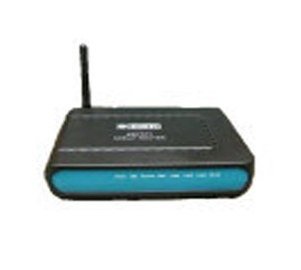
Beetel 450 TC1 is a WiFi Modem with four Ethernet ports. The Modem support latest ADSL and WiFi standards with a maximum download speed of 24Mbps. You can configure this for BSNL, MTNL or any other ADSL broadband connections through the user friendly web interface.
Connect this Modem with your PC/Laptop by using the supplied Ethernet Cable. Open the browser and type http://192.168.1.1. Type username = admin and password=admin in the popup window. Now the modem configuration page will be displayed
Select the Interface Setup Menu
Now you have to configure the Modem as per your requirement. The Modem may be preconfigured with Multiple Virtual Circuits as per the ISP. You have to edit/delete the preconfigured circuits according to your ISP. Click the PVC summery button to get the Service Information summary. In this popup window you will get the pre configured circuits.
If you want to configure your Modem for BSNL select the PVC which is configured with VPI=0 and VCI=35 (In this screenshot it is PVC2). For MTNL go for the PVC which is configured with VPI=0, VCI=32 (In the screenshot it is not present . In this case you have to select any PVC and edit it). For Airtel go for the PVC configured with VPI=1, VCI=32 (Here it is PVC0)
Close the Summery Popup window and select the required PVC as specified in the above mentioned step. Now here we have selected PVC2 for configuring the modem for BSNL broadband connection (Remember we selected PVC2 because it is already configured with VPI=0 and VCI=32 which is the settings for BSNL)
Select ATM QoS as UBR
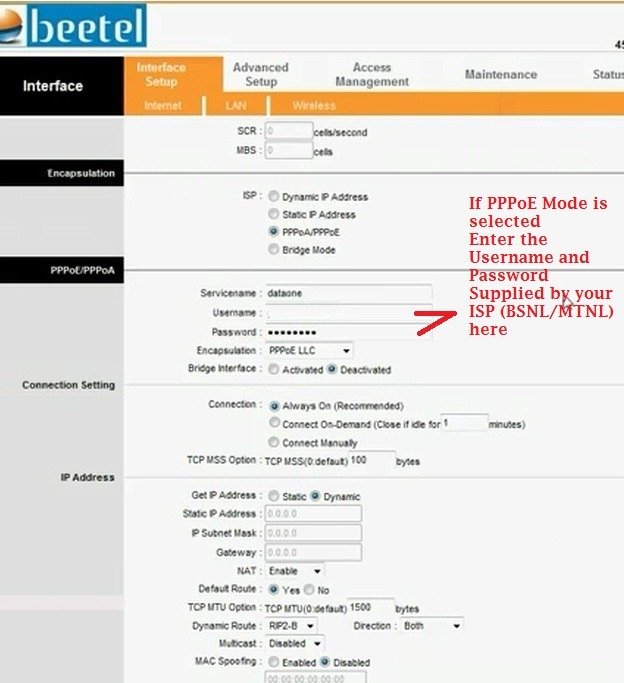
Encapsulation ISP PPPoE/PPPoA
In PPPoE/PPPoA
- Service name (Anything to identify your ISP- say dataone, MTNL, Airtel etc)
- Username and Password (Supplied by your ISP)
- Encapsulation – PPPoE LLC
- Bridge Interface- Deactivated
In Connection Settings
- Connection- Always On
- Rest all settings keep as it is
Save the settings
Go to the Maintenance Menu
- Select the System Restart with – Current settings
- Restart
After rebooting you can surf internet.
WiFi Configuration and Security settings of Beetel 450 TC1 Modem
Select the Wireless Submenu under the Interface setup (See screenshot)
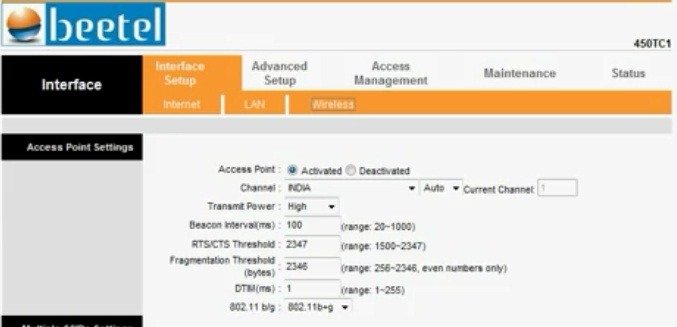
Access Point Settings
- Access Point: Activated
- Channel: India – Auto
- Transmit Power : High (If you want to limit the usage within your room can set to medium or low)
- You can keep all the other settings to default.
Multiple SSID Settings
- SSID Index: 1
- Broadcast SSID: Yes (If you want to keep the SSID secret can set it to “No”. In this case the router will not broadcast the SSID (Name of your WiFi network). Then you have to type the SSID manually in your PC while establishing the connection.
- SSID: Identification name of your network
- Authentication Type: This is the security setting of your Network. Which decides the authentication and encryption techniques. The available options are Disabled, WEP64 bit, WEP 128 bit, WPA PSK and WPA2 PSK. Avoid using outdated technologies like WeP. Select WPA2-PSK or WPA PSK from the drop down menu
WPA PSK/WPA2 PSK
- Set the WPA encryption to TKIP or AES
- Enter a non guessable key (No dictionary words) mixed with figures and characters in WPA Pre Shared Key field.
- In WPA group interval field, you can enter 100(This is the interval between the keys are refreshed means of you set 100 your keys will be refreshed every 100 seconds)
Wireless MAC address filter
Mac filtering will give you additional foolproof WiFi security. MAC (Media Access Control) address is a unique number of each network hardware. This is the identity of a machine . There will not be two network cards (Any type) with a same MAC address. This is the manufacture set hard coded one.
Through the MAC filtering you can optionally allow or deny a particular WiFi device on your network. You have to enter the MAC address of the client machines in the Modem to allow or deny a particular machine. For example – You have four laptops in a network and you want to enable MAC filtering. For this the MAC address of each machines to be entered in the Modem for connectivity, means you have to save the addresses of all four machines in your Modem.
How to find MAC address
- For Windows PC go to start > Run ant type cmd
- Then type ipconfig/all and you will get some values as displayed.
- Note down the physical address of WiFi adaptor – This is your MAC address.
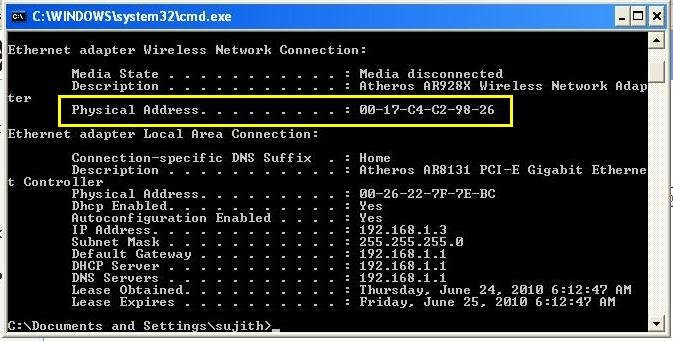
Important: You might have noted down the MAC Address like this 02-14-C4-C2-98-26 but if you enter like this Modem will display an error message “invalid MAC address”. You have to replace the “-“ with “:” means to enter the address like 02:14:C4:C2:98:26
- To enable the Mac filtering Set the Mac Address filtering to “Activated”
- Set the Action to “Allow association”
- Enter the MAC address of your devices in the Mac Address fields
Save the settings and Reboot the Modem. Then connect your PC, Laptops or Smart phones using WiFi.
{ 155 comments… read them below or add one }
← Previous Comments
Next Comments →
Dear Sujith,
I am trying to configure a Buffalo WCR-GN to connect wirelessly to the airtel beetel 450tc1 router to extend the range of my network. I see from a number of posts on forums that 450TC1 may have the WDS setting. Cant seem to locate it on the admin screens. My firmware version is TM4-0Q-008. Do I need to upgrade it?
Thanks much!
Gautam
Dear Sujith,
I am having Beetel 450 TC1 router which was configured for reliance and was working fine from 6 months. But from past 20 days it was not working properly so i decided to reset it and tried to configure as mentioned in your post. When i select Virtual circuit as PVC2 (VPI = 0 and VCI = 35) for reliance and restart the modem under maintenance tab, virtual circuit resets to PVC0 and hence i was unable to connect to internet.
Can you please help me resolve this issue.
Thanks,
Ranjith
Delete the existing Virtual circuits and make the new one with VPI=0, VCI-35
can u plz tell me how to delete the old settings in pvc0
i have beetel 450TC1 model but now i dont have login username and pass.how can i inter on the model??plz help me??
I bought Beetel 450 TC1 router but after configaration i have a prob as the the new configaration is not getting saved while restart.
please resolve my prob.
Dear Sujith,
I am having MTNL 450 TC1,I am having problem in the setting of this particular device.I am not be able to connect my PC and Laptop through Wi-Fi(wireless).
Can you please help me resolve this issue as soon as possible.
Thanks,
Firoz
can i connect my beetel 450 TC1 router with lan broadband providers..such as tikona?
Yes… to know more you can call me on +91-8878046489
Hey Sujith i went through your articles, they are pretty awesome.
Hey Can you help me in unlocking my beetel 450TC1 ADSL2+ROUTER , i’m using bsnl broadband..but its not supporting the wi-fi and the vendor is asking for money to unlock the wi-fi..can you please help ?
Bought an ipad 2 16 gb WiFi only, model on the day before yesterday.
I think i should not have bought it.
Facing wifi problems. it gets connected to the internet and suddenly loses connection. i cannot browse though the signal strength shown is excellent.
Once i put it to sleep then when i open it again the connection has to be disabled and then enabled to surf the net.
The customer care person told me to change the password of the modem to wpa/wpa2 psk. have done that but no end to the problem.
i use mtnl delhi connection.
all other devices like laptop, phones are doing fine with the wifi connection.
This is a very frustating experience i would not have bought it if i had known this.
please help me if you can.
I have 450TC1 modem of mtnl.
indranil.
Try to change the WiFi channel
But how does one change the wifi channel?
Yeah, changed the channel to 2 from 1. Let’s see what happens.
Thanks.
Indranil
hi,
i am a user of MTNL broadband. I am trying to share internet but i am unable to share it. I bought a switch with 8 LAN ports but while sharing the connections, 2 out of 3 are not access able. Whereas i am able to connect. Could you please suggest???
regards
Chander
Hi Sujith,
I have applied for airtel connection in Meerut (UP). The highest range modem which they are supplying with broadband has 15m wireless range. The airtel broadband is only compatible with beetel and biocon modems. Can you please suggest me a modem which has more than 50m range.
Thanks,
Dear Sujith,
I am having beetel 450TC1 router i want to use it on BSNL but 192.168.1.1 is not opening when opening not taking passoword as below
un admin
pass – admin
un admin
pass 1234
un admin
pas password
un password
pas – password
all above it is not taking kindly help me
first reset your modem ..and then use un– admin and pass– password.
to know more you can call me on +91-8878046489
Hi sujith,
Is it possible to increase the wifi signal gain for this modem?
i am using for my airtel BB and the signels are very low in other rooms.
how can i increase the signel strength?
-prashant
No body is helping to use guide me to connect my 2nd SSID – MGMNT (WEP secured) in airtel.
Thanks a lot Sujith sir, I’m able to use internet through LAN cable
but here i’ve a problem with connecting to wifi..
(link to the pic)
https://lh4.googleusercontent.com/–eYv8Z5S008/T7qB3B7xCXI/AAAAAAAAAdA/6gqtjGs2VKs/s430/Untitled.jpg
Please help!!! thanks
Hello Sujith,
Could you please help me in configuring the QOS option in Beetel 450 TC1. I am using Airtel broadband where there are 6 users using this service. I came to know that through QOS option you could enable or allot a fixed bandwidth for each users on the network.
Is the default firmware enough for this task or do i need to install tomato firmware for the same.
Please help me out on this.
thanks.
i want to add lan clients for 450tc1… i did not find anything like “LAN CLIENTS” in “ADVANCE SETUP” tab!!!
Please help me out..!
I own a 450TC1 modem…bsnl broadband…when i try to connect to my wi-fi it saiys secured with 802.1*eap…it is also asking for identity and anonymous identity….please help
Hi
When ever I reset this modem, the password changes to default. However after a few days the neither does the changed password or the default password work. I need to manually reset the device to access the webinterface. Why is it so ?
One more thing how to access the shell of this 450TC1, currently we are just getting some fixed command.
I have reliance broadband and i want to config betel wifi modem.
but i have no setting please help me
thanks……..
HI SUJITH,
I got my new wireless modem beetle model no: 450tc1 adsl2+ router. i hav bsnl broadband connection. i asked bsnl technicians to configure. they denied to configure as it was used earlier for airtel broadband. hence cannot be configured. is it so?? can u tell me how to configure? pls help me out.. bye
Hello Shiva,
Please refer to beginning of the page. The reason this page was created is to help guys who have problems like you have. There are very clear steps given by author on how to configure your BeeTel 450TC1 ADSL2+ router. Please try that procedure and then if you still face some issues, you can then list down your problems here. It makes no sense to provide repetitive information and increase the blog size. I hope the author agrees to my pov.
@Vikram 100% agree with you
@Shiva- Read the complete post and follow the configuration steps. If you are facing problems please share the same.
Hi Sujith
Thanks or the instructions. I was able to configure these and also see the green led for Internet glowing now.
Further I am not able to connect the internet because when I see the diagnostics for PVC5 (which has the 0/35 settings for VPI/VCI) the “Ping Primary Domain Name Server” shows Failed. I can see in the status as connected for PVC5 with the dynamic IP address, the DNS details as well, but the gateway IP address is 0.0.0.0 for some reason.
I had further checked in routing table in the modem and I could see the default gateway IP address there when the internet LED had started glowing. So, this means that the model is able to connect to the BSNL network and able to pick up the IP details as well.
Later I had also tried to put in the static IP with default gateway 192.168.1.1 for the network adapter on my PC as well to see if it picks it from here, but that didn’t work as well.
PS: I have the BSNL connection at Gurgaon and this works fine in another Dataone i-ball modem provided by BSNL. I have got a new Beetel 450 TC1 wireless modem to configure the wireless option.
Any help will be really appreciated.
Thanks
Delete all PVCs and make a fresh connection.
Awesome! Thanks Sujith, this is working now.
I am wondering how simple and basic this was but I couldn’t think of it!
Thanks again
Rajat
Have MTNL 450 TC1 wireless router, working fine on laptop, showing connected on android phone but not transferring data on phone. read all your post couldn’t find relvant info. Please help..
Is there any procedure to make the modem’s firewall off?
Awesome work..Absolutely splendid..I was very apprehensive about setting this modem up on BSNL and thought it would take up considerable effort and time..This page made it a cakewalk..I am a noob when it comes to modem configuration etc..
Very Very Thank You Sir..It is definitely work like yours that makes life easier for thousands out there…
Hi ,
i am using beetel 450 tc1 modem. I am sharing my wifi with two roommates, i want to control my bandwidth by allowing my friends only fixed amount of bandwidth. I have already went through various bandwidth throttling software but they were not useful.
plz give me the solution
thanks.
I have having trouble using the instruction above… it doesn’t connect to the internet… error comes that PPP down and some time it gives error saying username and password is invalid, and sometime it shows connected but i am unable to surf internet… please help me…
Dear Sujith,
I have been using this router 450TC1 since long, but recently it stopped working and when I checked the setup page, there is no interface setup tab. This is very strange. Could you please suggest a solution?
Regards,
Anil
Do the factory reset and re-configure it
It’s under mantainance ==>restart==> select factory setting restart
Thanks but I don’t see any option for a factory reset. Can you please guide me?
BTW, I have already reset the router by pressing the reset button for 15seconds but still the intereface setup did not reappear.
After pressing the button for ten to fifteen seconds it must reboot. After rebooting also if the interface setup is not reappearing, then the firmware may be corrupted. Let me check the firmware for the router is available or not.
Yes, it rebooted but still there is no interface setup. Kindly let me know if there is firmware update available anywhere.
Thanks,
Anil
Hi
Before this configuration my LAN connection was working . But now I am geeting LAn connection error “Connecting through WAN Miniport (PPPOE)”.My WIFI is sending the signal but in while connecting, it ‘s connection with Limited Access so ultimately I can’t open any sites.
Hi Sujith,
I have purchased Beetel 450TC1 and configured for BSNL and is working fine. Now i have moved from remote location to city. Now I have got local broadband with LAN cable. I want to utilize the Wifi Modem as Wifi router. Is there any way to solve this. If so Please let me know. I hope we can do this if we can override the ADSL settings. I have followed these instructions but no luck. http://broadbandforum.in/airtel-broadband/60457-use-beetel-450tc1-adsl-modem/ Let me know whether we can achieve this.
Thanks.
Dear Sujith
Is there any way to limit the data usage on the modem. I have a 2.5 GB Data connection and I use my desktop, my laptop and two android phones to access the net and so I need to limit the data at the wi fi modem…..pl advise ……
Regards & thanks
25 Sep 2012
Sir, im not able to connect to the wifi i tried all your above steps but the problem in my router is that im not able to edit the Authentication Type tab it has been defualted with WPA2 and is not connecting to any wifi products. and there is a new option in the wifi content called radius server do i need it to edit something in it to get connected please do give a request please sir thanks & Regards.
HI Sujith Sir,
Am using beetel modem T450 with BSNL ISP
It was working great for 2 months… And suddenly i was unable to detect Wi-fi in any of my device (Laptop+mobiles) … But i can work fine through LAN alone…
I don t know Y my wi fi not detecting ..
I have tried
a) Reset , Factory reset
b) Re Config
Every time i re-config the net working fine .. but wi-fi is not..
But Wifi status showing GREEN colored light in stable ..
I have checked the wifi config many times , everything is fine..
Is there any other reason that wifi is not detect to devices. ??
Is this correct ??
I have confusions in your decriptions : you have mentioed as below:
(Remember we selected PVC2 because it is already configured with VPI=0 and VCI=32 which is the settings for BSNL)
VPI=0 and VCI=35 Is this the setting for BSNL ??
Please clarify
Hi,
This is praveenraj. I am using this modem with BSNL BB connection. Last two weeks it was working well. But recently It workes few times and often not works. The internet light and DSL light are stable only when I hold the PHONE in dialled mode. And goes off when It put down. Seems funny
but help me to resolve this.
Check your phone wiring. There should not be any parallel connections before the splitter.
hi sujith ,
i am having a mtnl broadband connection and i got mtnl BT450TC1 modem and it is working fine on my PC. Recently i brought a smart phone and it is WI-Fi enabled and it scans my mtnl connection whenever my modem is ON and i could browse internet on my phone with the help of a preshared key which i found in settings on 192.168.1.1 … but it only works when my PC is ON … i am not able to access internet via modem ( turned ON ) whem my PC is off. ….. so please help sir.
What error you are getting? Are you sure that the smart phone wifi scan shows the same SSID which is entered in the WiFi settings of your Modem?
Hi Sujith,
I have BSNL broadband connection.Last week my landline has problem.Is corrected.But now bradband is not working.I am getting message as “limited access” & “DNS server not detected”.Please help me in resolving this problem.
Rgds
Mahesh
I hope ADSL link is working (LED blinks on start up then glows steadily). Try to enter DNS server manually in your network adapter . You can use google DNS server 8.8.8.8 and alternate DNS 8.8.4.4
IP adress 192.168.1.2
Default gateway 192.168.1.1
Hi Sujith,
Thank you for quick reply.
ADSL LED is glowing & wireless LED is not glowing.Other LAN LEDs are glowing when connected.I normally use wireless.What could be the reason ?
Rgds
Mahesh
Are you facing only with Wireless?. Enter DNS servers and IP manually in wireless adapter settings.
Hi Sujith,
I am facing problem in both wired & wireless connection.
rgds
Mahesh
Just confirm from BSNL that no issues from their side. Try to re-configure the modem after a factory reset.
hi nice article
I tried the above steps for reliance broadband and didnot worked.
can i able to use wifi internet with “Beetel 450 TC1″ for reliance broadband ?
Atleast will it work with LAN cables ?
thanks
Hi, I think Reliance broadband is using some different kind of authentication. Normally where you are entering Reliance credentials to connect? In their web interface? In that case, try to configure the Modem in “Bridge Mode”.
I am facing two major problems, which are already mentioned here. But the solution is not given for the same. So I had to post the problem.
1- When I click the Restart button on Maintinance Page, the router shuts down but never come back to life. The page also says unable to connect (I am using chrome). Only the red LED is on. I need to manually restart.
2- When I restart, internet does not work. Why ?? I go back and look in to the internet settings, nothing is saved. What I notice is, even my password resets to ‘password’.
I seriously doubt the firmware. Something is wrong. Please help.
I Have Authentication Type option disabled under Multiple SSIDs settings.. The default option is WPA2 Enterprise..
Can u help me to switch to WPA PSK/WPA2 PSK
Hii sujith…
How Can i increse the speed of my wifi connection..
Regards,
Sreeenath S
Speed of the internet connection is depends upon the internet connection. If you have a 512 Kbps internet connection, WiFi can’t give you the speed more than this.
Dear Mr.Sujith,
I appreciate your services. I have a MTNL Tri Band Internet Connection.The Model of the DSL Modem is DNA-A212.For the past couple of days it is resetting itself and the internet is not properly working as it resets. Yesterday the MTNL Technician cane with a 450 TCI model and configured it.It works only with Windows desktop PC. My Apple MacBookAir and the Mobile doesn’t pick up internet through it recognizes the modem.
Can You Please help me?
First please confirm the problem exists in both Wired and Wireless connection or not. Are you able to connect the modem through WiFi? You must check the WiFi Configuration settings also.
← Previous Comments
Next Comments →