Configuration of Beetel 450 TC1 WiFi ADSL Modem for BSNL, MTNL and Airtel Broadband

by Sujith on 09/19/2011

Beetel 450 TC1 is a WiFi Modem with four Ethernet ports. The Modem support latest ADSL and WiFi standards with a maximum download speed of 24Mbps. You can configure this for BSNL, MTNL or any other ADSL broadband connections through the user friendly web interface.
beetel thumb Configuration of Beetel 450 TC1 WiFi ADSL Modem for BSNL, MTNL and Airtel Broadband

Connect this Modem with your PC/Laptop by using the supplied Ethernet Cable. Open the browser and type http://192.168.1.1. Type username = admin and password=admin in the popup window. Now the modem configuration page will be displayed

Select the Interface Setup Menu

1 thumb Configuration of Beetel 450 TC1 WiFi ADSL Modem for BSNL, MTNL and Airtel Broadband

Now you have to configure the Modem as per your requirement. The Modem may be preconfigured with Multiple Virtual Circuits as per the ISP. You have to edit/delete the preconfigured circuits according to your ISP. Click the PVC summery button to get the Service Information summary. In this popup window you will get the pre configured circuits.

If you want to configure your Modem for BSNL select the PVC which is configured with VPI=0 and VCI=35 (In this screenshot it is PVC2). For MTNL go for the PVC which is configured with VPI=0, VCI=32 (In the screenshot it is not present . In this case you have to select any PVC and edit it). For Airtel go for the PVC configured with VPI=1, VCI=32 (Here it is PVC0)

Close the Summery Popup window and select the required PVC as specified in the above mentioned step. Now here we have selected PVC2 for configuring the modem for BSNL broadband connection (Remember we selected PVC2 because it is already configured with VPI=0 and VCI=32 which is the settings for BSNL)

Select ATM QoS as UBR

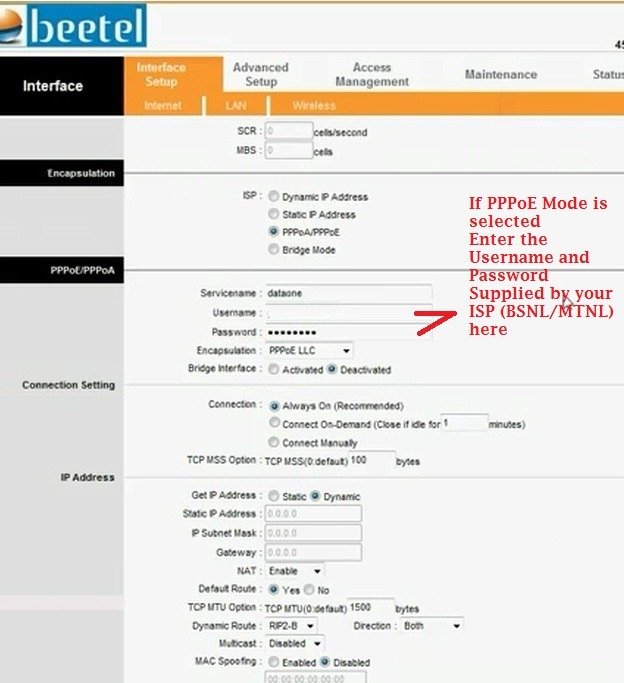
Encapsulation ISP  PPPoE/PPPoA

In PPPoE/PPPoA

  • Service name (Anything to identify your ISP- say dataone, MTNL, Airtel etc)
  • Username and Password (Supplied by your ISP)
  • Encapsulation – PPPoE LLC
  • Bridge Interface- Deactivated

In Connection Settings

  • Connection- Always On
  • Rest all settings keep as it is

Save the settings
ppoe thumb Configuration of Beetel 450 TC1 WiFi ADSL Modem for BSNL, MTNL and Airtel Broadband

Go to the Maintenance Menu

  • Select the System Restart with – Current settings
  • Restart

After rebooting you can surf internet.

WiFi Configuration and Security settings of Beetel 450 TC1 Modem

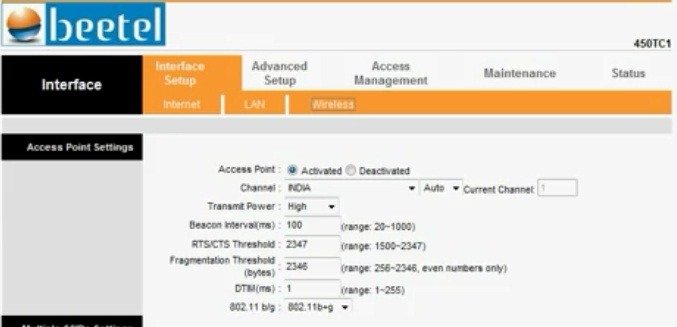
Select the Wireless Submenu under the Interface setup (See screenshot)
wifi1 thumb Configuration of Beetel 450 TC1 WiFi ADSL Modem for BSNL, MTNL and Airtel Broadband

Access Point Settings

  • Access Point: Activated
  • Channel: India – Auto
  • Transmit Power : High (If you want to limit the usage within your room can set to medium or low)
  • You can keep all the other settings to default.

Multiple SSID Settings

  • SSID Index: 1
  • Broadcast SSID: Yes (If you want to keep the SSID secret can set it to “No”. In this case the router will not broadcast the SSID (Name of your WiFi network). Then you have to type the SSID manually in your PC while establishing the connection.
  • SSID: Identification name of your network
  • Authentication Type: This is the security setting of your Network. Which decides the authentication and encryption techniques. The available options are Disabled, WEP64 bit, WEP 128 bit, WPA PSK and WPA2 PSK.  Avoid using outdated technologies like WeP. Select WPA2-PSK or WPA PSK from the drop down menu

WPA PSK/WPA2 PSK

  • Set the WPA encryption to TKIP or AES
  • Enter a non guessable key (No dictionary words) mixed with figures and characters in  WPA Pre Shared Key field.
  • In WPA group interval field, you can enter 100(This is the interval between the keys are refreshed means of you set 100 your keys will be refreshed every 100 seconds)

wifi2 thumb Configuration of Beetel 450 TC1 WiFi ADSL Modem for BSNL, MTNL and Airtel Broadband

Wireless MAC address filter

Mac filtering will give you additional foolproof WiFi security. MAC (Media Access Control) address is a unique number of each network hardware. This is the identity of a machine . There will not be two network cards (Any type) with a same MAC address. This is the manufacture set hard coded one.

Through the MAC filtering you can optionally allow or deny a particular WiFi device on your network. You have to enter the MAC address of the client machines in the Modem to allow or deny a particular machine. For example – You have four laptops in a network and you want to enable MAC filtering. For this the MAC address of each machines to be entered in the Modem for connectivity, means you have to save the addresses of all four machines in your Modem.

How to find MAC address

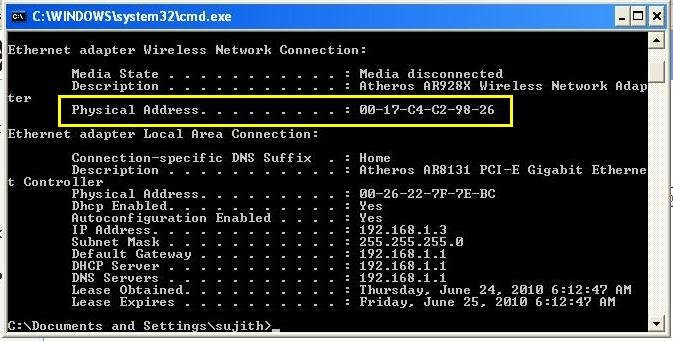
  • For Windows PC go to start > Run ant type cmd
  • Then type ipconfig/all and you will get some values as displayed.
  • Note down the physical address of WiFi adaptor – This is your MAC address.
mac address Configuration of Beetel 450 TC1 WiFi ADSL Modem for BSNL, MTNL and Airtel Broadband

Important: You might have noted down the MAC Address like this 02-14-C4-C2-98-26 but if you enter like this Modem will display an error message “invalid MAC address”. You have to replace the “-“ with “:” means to enter the address like 02:14:C4:C2:98:26

  • To enable the Mac filtering Set the Mac Address filtering to “Activated”
  • Set the Action to “Allow association”
  • Enter the MAC address of your devices in the Mac Address fields

Save the settings and Reboot the Modem. Then connect your PC, Laptops or Smart phones using WiFi.


{ 100 comments… read them below or add one }

rajat September 19, 2011 at 8:32 PM

hey i am done with lan configuration but facing problem with wireless configuration.
m not able to select authentication type in multiple ssid settings field.
its showing me these fields:-
–>access point settings (done as guided by u)
–>multiple ssid settings (not able to select authentication type)
–>radius server (dnt knw whats this)
Main Server Address :
Main Server Port :
Main Server Share secret :
Backup Server Address :
Backup Server Port :
Backup Server Share secret :
Network Re-auth Interval
–>wpa2
encryption type=tkip selected
WPA Group Rekey Interval(dnt knw what to do with this)
–>wds settings(whats this???)
WDS Mode : Off
WDS Encryption Type : TKIP
WDS Key : (8~63 ASCII characters or 64 hexadecimal characters)
Mac Address #1 :
Mac Address #2 :
Mac Address #3 :
Mac Address #4 :
–>wireless mac address filter
plzzz helpppp!!!!!!!!

Reply

Sujith September 19, 2011 at 8:43 PM

What is coming under the Authentication Type Field? You are not getting the drop down menu?
Which OS you are using?

Reply

rajat September 20, 2011 at 10:56 PM

m able to see drop-down but it is preset-ed as ‘wpa2 enterprise’ and i cant select that drop-down menu mean m not able to click on drop-down so that it shows me other options for authentication!!
M using Microsoft XP

Reply

rajat October 2, 2011 at 7:14 PM

reply please…

Reply

Sujith October 2, 2011 at 7:22 PM

Sorry for the delay, Plz check the Access point is “Activated” or not. As you are using microsoft XP SP2, WPA 2 is not supported. Use WPA personal.

Reply

rajat October 3, 2011 at 5:03 PM

wpa2 enterprise is preselected. it can not be changed because i have no access to select other options!
can you give me your mail id please so that i can send you screen-shot for that page.

Reply

rajat October 3, 2011 at 5:18 PM

n ya sir,
Access point is activated and m using XP professional version 2002 service pack 3 (SP3).

rajat October 3, 2011 at 5:02 PM

wpa2 enterprise is preselected. it can not be changed because i have no access to select other options!!
can you give me your mail id please so that i can send you screen-shot for that page.

Reply

Chethan October 6, 2011 at 7:57 AM

Hello,
I’m unable to change Authentication Type under wireless. Its a readonly field. Need your support.

Thanks

Chethan

Reply

rajat October 8, 2011 at 9:35 PM

am also facing the same problem of authentication under wireless!!
plz some1 help..

Reply

Sujith October 8, 2011 at 10:26 PM

Please confirm that you are using the Modem supplied by Airtel or not?

Reply

rajat October 9, 2011 at 12:46 AM

i am using the modem of beetel i.e. 450tc1 but not provided by airtel, i have purchased it from market.

Reply

Sujith October 9, 2011 at 11:01 AM

It has been observed that the higher firmware versions have some problems with editing of WiFi Authentication type. One option is to downgrade the firmware to a lower version. Remember care should be taken while doing that. Backup your old firmware first.
You can download the firmware from here http://122.166.105.80/Firmwares/IPTV-FIRMWARE/FIRMWARE/BEETEL-450TC1/
beetel 450  firmware

Reply

rajat October 9, 2011 at 1:28 PM

thanku sir.. thanx a lot with only your support i am able to configure my modem.
thanx a lot!!

Reply

Sujith October 9, 2011 at 1:40 PM

Welcome Rajat, It’s my pleasure . Stay tuned.

Reply

Vijay October 13, 2011 at 10:47 PM

Thanks dude. Nice tutorial. And now mine is working for me..

Reply

mukeshkumar October 19, 2011 at 5:11 PM

hello sir i bought a type II beetel adsl modam
modam version lates …..25
plz help me congigration

Reply

Raghuram October 20, 2011 at 4:26 PM

Dear sujith,
I have beetel 450Tc1 ADSL2+ router with bsnl broadband connection. i tried to get the internet connection as per the screenshots given above. but its not working man. Also if i save any setting with current configuration, it is not saved there. again i have to do the same. Kindly help me in this. it will be a great helpful man

Reply

Devil October 25, 2011 at 5:03 PM

Can u just put the link of latest firmware….really needed it my iPad is having wifi connection problem,,,,

Reply

DHANANJAY October 30, 2011 at 11:14 PM

Hi,
Is there any way to disable MGMNT ssid for beete; 450TC1? as its by default and it’s key also known to everybody? I’m worrying of wireless network security. BEETEL 450TC1 mannual displays the key and SSID.

thanks
dhananjay

Reply

ntr November 3, 2011 at 10:06 PM

Hi,

I too have the same issue and could not disable “MGMNT” SSID for beetel 450TC1. Can anyone help me in this regard?


N.T. Raman

Reply

Kiran December 29, 2011 at 10:41 AM

Do u know, how to disable MGMNT ssid? if yes please, share.

Reply

Tanmay M October 31, 2011 at 1:57 AM

Hello Mr. Sujith:

I am looking to setup WDS between 450TC1 and Belkin router (F5D7230-4). While the WDS setting is easily available on the Belkin router, I am unable to find the same on the 450TC1. I see Mr Rajat list out this option hence I presume this option is available on this model. Does this have to do with the Firmware version? The model that was provided to me by MTNL very recently reads version V85.2.04.02.

Your earliest response would be much appreciated.

Regards
Tanmay

Reply

Vikram Chugh November 1, 2011 at 6:06 PM

Hello,
I too had a problem with setting up WiFi, but if you downgrade your firmware version, you can select the encryption type of the MGMNT network to WPA2 PSK. The link is given in the thread.
After editing and saving the configuration, the modem works good. Anyway all this was sometime back.
The new problem now is that the connection keeps dropping and coming on very frequently and one strange error I get is that in the Status window, it shows PPP password invalid.
Has anyone had this problem of invalid PPP password?

Reply

vivek kapoor November 11, 2011 at 7:24 PM

Does this modem( Beetel 450TC1) has Bridging facility between same models?

Reply

Pramod Singh November 22, 2011 at 8:02 PM

I need settings for I Pad 2 wifi. We have MTNL connection and router model 450 TC 1.
The ipad is showing internet connected but on opening internet, the browser says ‘not connected to internet’. Is this a router problem or settings problem.

Reply

Nito January 22, 2012 at 10:41 AM

Did you find the solution on how to fix this yet?
I have been having this issue for a month now…a bit frustrated..please help
THANX

I need settings for I Pad 2 wifi. We have MTNL connection and router model 450 TC 1.
The ipad is showing internet connected but on opening internet, the browser says ‘not connected to internet’ and if it connects it only stays connected for 5 minutes before I have to turn on and off aiplane mode.

Reply

Abihost November 25, 2011 at 11:30 AM

@Pramod: What is the current firmware version on your router?
My iPad connects ok but disconnects from the Internet after a couple of minutes. I have to go to the iPad settings and turn off wifi and turn it on again. I suspect the problem is with the router ‘cos it works fine on other wifi networks( not at home). Specifically, I think it has to do with using different wifi channels. Try using only 802.11n

Reply

M.M January 2, 2012 at 6:54 PM

@Pramod and @Abihost
I am experiencing the same issue issue on ipad, iphone and ipod touch.
I keep having to go Settings and enable air plane mode and then disable it.
However, i dont seem to experience this issue on my Android phone. The android phone doesnt require any fiddling with the wifi settings. It just works everytime.
So just wondering if its got to do with a particular router setting that impacts only iOS devices?

Reply

Nito January 22, 2012 at 10:47 AM

I am new to these “boards” so please excuse me if I am being redundant but there are multiple issues discussed here so I wonder if ….anyone found the solution on how to fix this yet?
I have been having this issue for a month now…a bit frustrated..please help
THANX

I need settings for I Pad 2 wifi. We have MTNL connection and router model 450 TC 1.
The ipad is showing internet connected but on opening internet, the browser says ‘not connected to internet’ and if it connects it only stays connected for 5 minutes before I have to turn on and off airplane mode.

Reply

Nito January 25, 2012 at 4:25 PM

Just to key everyone with the iPad disconnect issue know that I got the mtnl 450tc1 router switched out by the company and although it had the same firmware version it works fine and does not disconnect :-)

Reply

Shiva March 8, 2012 at 11:43 AM

I also have the same problem when connecting to the mtnl 450tc1 modem from my ipad2. the connection goes off every 2 minutes and i have to go to settings and forget the mtnl network and connect again. I am very frustrated and do not know the solution to the problem. i understand some others have the same problem, if anyone has a solution it will be appreciated if it is posted here.

Reply

shravan minocha December 9, 2011 at 10:17 PM

i am having the same problem…. i have mtnl connection with 450 tc1 modem… net connects to the ipad and works fine but disconnects when non using net on ipad even for 5 minutes….if i am reading a email and by the time i reply it gets disconnected… some problem with modem co it worksfine on other wifi networks… someone plz give us a solution..

Reply

Bhavin Udeshi December 13, 2011 at 6:27 PM

Hi, I am using Beetel TC1 type wireless router from MTNL. My problem is that wireless network signal is dropping in the other room as there are 2 walls in between the wireless modem and the point of use . We are not able to use ipad , iphones etc. in that room . I need a compatible Access point or signal repetitor which can be configured with MTNL wireless modem. I was suggested to use tp link / netgear access point for this purpose. Can anybody confirm if this access point is useful for my application. Is configuration simple with MTNL router.

Reply

Kiran December 29, 2011 at 10:44 AM

Guys, As already asked by others, How to disable the MGMNT ssid on beetel 450 TCI, Since the password is known to all. I’m worried about security n usage.

Reply

Sujith December 29, 2011 at 12:17 PM

Select a new SSID instead of default.
Use mac filtering for added security. It will prevent unauthorized access even if the ssid and password are known

Reply

Kiran December 29, 2011 at 6:30 PM

Sir, I did create new ssid, with my surname with authentication WPA2-PSK. But still I can see 2 ssid. With MGMNT.

Reply

Vikram Chugh December 29, 2011 at 6:56 PM

Hello,
Looks like there are ome more people who are not able to select Authentication Type as WPA2-PSK .Well, as already told in the mail thread before, the reason you are not able to select Authentication Type is because of your modem’s Firmware Version. You can see which you have under the Maintainence> Firmware tab. I had the same problem too. When I got the modem, the Firmware Version was TM4-0Q-025. I downgraded the Firmware to use version TM4-0Q-008 and I was able to select the Authentication Type.. Follow these native steps to select the Authentication Type:
Note: Its recommended to take a backup of the current firmware version on your modem.
1. Navigate to http://122.166.105.80/Firmwares/Beetel%20450TC1/.
2. Click and download TM4-0Q-008.zip.
3. Unzip the file to your local drive. If you do not have a zipping utility, download the same from http://www.winzip.com/downwz.htm.
4. From your computer or device, log into the home page of the modem (type, http:\\192.168.1.1 in the Address Filed of you browser. Use admin as the us and pw)
5. Click the Maintainence tab
6. Under Maintainence tab click on > Firmware tab
7. Under Firmware/Romfile Upgrade section click Browse
8. Navigate to the location where you downloaded and saved the file in step3.
9. Click UPGRADE
After the upgrade, restart the modem by selecting Current Settings radio button. You can also disable MGMNT by selecting a different SSID Index. You can actually give your own name for the SSID when you select a new SSID Index. You may also notice that you always see two SSIDs when your device is searching for the WiFI network, one called AirTel and the other called MGMNT. To avoid seeing Airtel, set the Broadcast SSID field to No for Airtel SSID Index.

Reply

Kiran December 29, 2011 at 8:40 PM

It’s done. Thank you.

Reply

Ansul Golchha December 31, 2011 at 12:28 PM

Thank u very much sir . Ur installation procedure helped to get my WIFI working

Reply

rockstar January 1, 2012 at 1:40 PM

can somone tell me how to block or limit the speed of p2p on the router….

p.s.iam using beetel 450tc1 adsl2+router

Reply

lokendra January 12, 2012 at 4:10 PM

i have already configure my wire setting in the configuration window and the net was working nicely now i want to setup my wifi connection but not able to open the connection manager after typing 192.168.1.1 in the browser…it shows the page cannot display what to do..what to do to open the setup manager,,,plz help me

Reply

lokendra January 12, 2012 at 4:15 PM

i am using internet by beetal modem from last 15 days but now i am not able to open the modem setup guide what to do…

Reply

Madhan January 26, 2012 at 10:38 PM

reset your modem(a small hole on backside of your modem). then type 192.168.1.1 from your browser. use admin as user and password as password…..

Reply

Vikram Chugh January 19, 2012 at 10:42 PM

How are you connecting to the router? Are you using a physical LAN cable or Wireless?
From what you say, I guess it’s thro, wireless. Connect your router to your device or pc using a LAN cable and then try opening the modem setup page by typing 192.168.1.1 in the browser of your device or pc.

Reply

ram krishna pandey January 22, 2012 at 3:30 PM

Not working user name password admin
Kindly help me
Beetel 450tc1 ADSL2 + router
Thanks r k pandey

Reply

naved January 22, 2012 at 5:32 PM

Plz tell … how can i find wan driver for beetel 450tc1 … plz help me…

Reply

Sujith January 22, 2012 at 6:07 PM

Go through the previous comments.

Reply

Vikram Chugh January 23, 2012 at 6:57 PM

Try this as your login details:
Username: admin
Password: password
It sometimes works, but really wonder how it changes back and forth from admin to password:(. The best thing is to set your own us and pw from I’m not sure but I think it’s from the Maintaince page.

Reply

rv January 25, 2012 at 1:28 PM

Mr Sujith
We are having a problem with Airtel broadband. The service guy came and said we need to replace the modem. Only the internet light is off. The rest are on. After he left we could connect to the net, but we are having problems with the speed and it is getting disconnected often. The Airtel Engineer says that even if the modem is ‘spoiled’ it will work when you switch it off and on and insists that we get the modem replaced and says Airtel speed is not at fault. Is he trying to hoodwink us? If a modem is not working can it connect to the net, or do they want us to buy one since the warranty just got over. Would appreciate a reply. Thanks

Reply

Sujith January 25, 2012 at 4:19 PM

If the Modem is faulty, you can’t connect to Internet. Frequent disconnection problem is mainly due to the Noise in line. Frequent disconnection is mainly due to
1. Faulty cable joints.
2. Your location is too far from ISP node.
3. Poor quality of cables
4. Faulty Modem

Reply

rv January 25, 2012 at 5:00 PM

Thank you sir, for promptly responding. Will check with a spare modem and then act accordingly.

Reply

rv January 25, 2012 at 10:19 PM

Thank you for the clarification.

Reply

Madhans January 26, 2012 at 10:28 PM

hello sir,
I am able to connect to internet from Beetel 450TC1 (ADSL2 + ROUTER) with my Beam network cable. I can use either LAN cable or WiFi at a time ONLY. but, And I can not use WiFi to both my laptop and a system simultaneously. If I am trying to connect net from other system, its browser is redirecting to beam portal to log in, if I log in there the network connection is disconnecting from the previously connected system. Please advise me. suggest the steps to use WiFi to my both laptop and system simultaneously.
thank you.

Reply

Madhan January 26, 2012 at 10:49 PM

Hello Sir,
My Beetel 450TC1 (ADSL2 + ROUTER) with my Beam network cable is working fine If I use any one of LAN cable or WiFi at a time ONLY. And I can not use WiFi to both my laptop and a desktop simultaneously. If I am trying to connect net from laptop, its browser is redirecting to beam portal to log in, if I log in there the network connection is disconnecting from the previously connected desktop. Please advise me. suggest the steps to use WiFi to my both laptop and Desktop simultaneously.
thank you.

Reply

lokendra January 29, 2012 at 6:26 PM

i am using my beetal 450tc1 router to acess internet.I am using 2 pc and 1 laptop at the same time…but i want to change the priority….actually i want maximum speed at the pc then at laptop…can you suggeest me how to configure modem to change the priority of the different port or wifi…
please help me
THANKYOU

Reply

Madhan February 1, 2012 at 11:35 PM

Hello Lokendra and Sujith sir,
could you please let me know the Beetel 450 TC1 configuration setting, so that I can use both my laptop and desktop simultaneously. now I am able to use only one(either laptop or desktop). If I am trying to connect from laptop, its browser is redirecting to beam portal to log in. if I logged in, then the network connection is disconnecting from the previously connected desktop. please help me.

Reply

lokendra January 29, 2012 at 7:28 PM

Sujith sir please respond to my question….

Reply

Sujith January 29, 2012 at 9:57 PM

Hi, You can’t restrict the speed to clients in Modem. You can use bandwidth manager software in each PCs to restrict the bandwidth

Reply

Madhan February 2, 2012 at 3:53 PM

Hello Sujith sir,
could you please let me know the Beetel 450 TC1 configuration setting, so that I can use both my laptop and desktop simultaneously. now I am able to use only one(either laptop or desktop). If I am trying to connect from laptop, its browser is redirecting to beam portal to log in. if I logged in, then the network connection is disconnecting from the previously connected desktop. please help me.

Reply

Mohammad Aquil February 27, 2012 at 12:54 PM

I am not able to login in beetel 450tc1 adsl2+ router as i switched my isp from airtel to mtnl and i want to use same router of beetel but it wont let me go in in GUI page of beetel router , reset the router several times still no go same message authentication error.

Any suggestions.

Thanks

Reply

lokendra January 31, 2012 at 6:56 PM

thankyou sir…for your reply

Reply

rashmi February 2, 2012 at 12:04 AM

Sujith Sir, I have purchased this beetel 450TC1 adsl2+ router (modem) and have bsnl broadband connection but after connecting this modem my wifi is not working and I have read all your suggestions and tried to download the firmware from the site specified by you but it is giving “page not found” i am unable to download this firmware …please help me.

Reply

lokendra February 2, 2012 at 10:59 AM

sir is it not possible to limit other user speed by QoS setting

Reply

Madhan February 2, 2012 at 11:32 AM

Hello lokendra,
Could you please let me know the BEETEL 450 TC1 configuration settings for Beam network, So that I can use both my laptop and system simultaneously.. Presently I canable to use any one if them… Please help me..

Reply

Madhan February 2, 2012 at 3:49 PM

Hello Lokendra,
could you please let me know how did you configure your Beetle 450TC1. i have been struggling for almost 10 days for that. please reply.

Reply

Sujith February 2, 2012 at 6:55 PM

Hi,
Contact your Beam customer care. They have to enable the multi user mode.

Reply

NIKHIL February 3, 2012 at 11:45 PM

Hi Sujith,

i have 450tci from MTNL mumbai they configured it and all. Net on my computer is working but am not able to connect it to my mobile. when i search form my mobile for wifi i can see mtnl but its password protected from where can i get the password ???

please help
thanks & regards…

Reply

Amit February 6, 2012 at 5:04 PM

Dear Sir,

I have Beetel 450CT1 2+ADSL i want to use it with Reliance Broadband connection but unable to configure please tell me the step by step setting so that i can use it, Actually i want to use wifi connection on my new samsung mobile s5360. I am trying t osetup it for last two weeks please help

Reply

vamshi krishna February 16, 2012 at 11:35 PM

Hi Sir,

i have beetel 450 tc1 router which was used to connect Airtel Broadband. now i want to connect to bsnl broadband. when i connect it and go the this link http://192.168.1.1. when it asked for authentication i gave username: admin and password : admin 0r password. by using both the combination i am unable to login. i dont remember the password when i set the first time when i used to connect for airtel. please provide me some solution.

Reply

Sujith February 17, 2012 at 2:13 PM

Just reset the modem to Factory reset. Press and hold the reset switch for few seconds.

Reply

Enaam February 21, 2012 at 9:00 AM

Hi ,
i m enaam from mumbai, can u plzz tell me how to block the web site’s from mtnl modem’s,,,,model number 450TC 1

Reply

Nitin February 21, 2012 at 5:40 PM

Hi Sujith,

I have a beetel 450 TC1 (ADSL2 + ROUTER) which was supplied to me by AIRTEL when I bought Airtel broadband. Now, I am switching my ISP from Airtel to BSNL.
Need your expert advise as to whether I can use the Beetel modem which was provided by Airtel to use BSNL broadband. If yes, what settings do I need to do?
If No, which Router with Modem will you suggest for BSNL broadband.

Thanks in advance!

Nitin

Reply

Sujith February 22, 2012 at 10:44 AM

You can use the same 450 TC1 Router supplied by Airtel for BSNL also. Only VPI VCI settings will be changed.

Reply

Mohammad Aquil February 27, 2012 at 12:53 PM

I am not able to login in beetel 450tc1 adsl2+ router as i switched my isp from airtel to mtnl and i want to use same router of beetel but it wont let me go in in GUI page of beetel router , reset the router several times still no go same message authentication error.

Any suggestions.

Thanks

Reply

prabhash February 22, 2012 at 8:00 PM

i have configured the modem and the routers internet indicator signal is blinking. All the configuration settings are done properly ppp up status is connected but still i’m not able to browse anything.Evan bsnl person is not able to configure.(moved from airtel to bsnl)

Reply

Ranjith B February 25, 2012 at 8:26 PM

Dear Sujith,

Is it possible to share the bandwidth using this modem in home network? because we 8 people are sharing the airtel broad band and some ppl are eating the bandwidth like anything. So we need to share it among ourself. Pls guide me.

If not possible to share the bandwidth with this modem, pls tell me which modem I need to buy to fulfil my need. :)
Thanks and Regards,
Ranjith B
mail me @ : ranjith.bhas@gmail.com

Reply

Sujith February 26, 2012 at 12:04 PM

It is impracticable with this router. However through QoS Settings you can restrict the bandwidth consumption of individual nodes against P2P networks. (QOs settings of this router http://192.168.1.1/qosqmgmt.html) For effective bandwidth restriction you have to use some third party applications like DU meter on each PCs or hardware interfaces like UTM.

Reply

BALJEET GUJRAL February 28, 2012 at 10:26 PM

Hi Sujith,
i have 450tci from MTNL mumbai they configured it and all. Net on my Macbook is working but am not able to connect it through Wifi . when i search for wifi i can see mtnl but its password protected. I try and use my phone no, CA number etc. which could have been possible passwords. MTNL helpline is of no use since they have no clue how to resolve this. from where can i get the password ???

please help
thanks & regards…

Reply

Sujith February 29, 2012 at 7:37 AM

You can change the WiFi password. Go through the WiFi configuration settings

Reply

K K Sajan March 8, 2012 at 6:12 PM

Dear Sujith,
1.I would like to purchase any genuine OS for my desktop.Where can i get it from for a cheap price?
2.Does LENOVO give any online offers for renewel of Annual Maint. Contract for their Laptops.I possess a LENOVO G450 Laptop and the warrenty has been expired long back.
please advice .
Thank you

Reply

Sujith March 8, 2012 at 7:17 PM

You can purchase online from Microsoft Online shop (Presently the site is down ). Another good option is ebay http://www.ebay.in/sch/i.html?_from=R40&_trksid=m570&_nkw=windows+7&_sacat=See-All-Categories
You can consult your nearest computer shop.

No idea about Lenovo offers on annual maintenance. You can contact the customer care of Lenovo India (http://www.lenovo.com/services_warranty/in/en/index.html)

Reply

Aditya March 10, 2012 at 3:49 PM

Dear Sujith,
I have this got this modem with airtel but now have changed to bsnl. The first day i directly plugged the connection and was able to access broadband. But could not access wifi.
But when i try this method u gave both broadband and wifi do not work.
PLS HELP ME..
THAnK YOU

Reply

Leave a Comment

*

Previous post:

Next post: